
…Proofing & Commenting Log Filecamp has a simple logical design that makes sharing and collaborating on files and media online a breeze – online and from any device. Every plan includes custom branding so you can use your company logo and brand colors to make your Filecamp feel just like home!Our Advanced and Professional Plans include even more custom branding features so you can make your clients feel like they are right at home too! You also get features tailored…
User Interface Overview
…files to Collection Remove files from Collection Share Collection links Delete Collection Labels Using Labels Commenting Start Commenting Invite users to comment Trash Trash Admin Account General Domain Users Log Themes Labels Tags Shares WebDAV Pages Templates Storage Tech stuff Problem solving Browsers Filecamp Status Subscription Payment options Signup & secure Trial Billing information & plan upgrades Quick Navigation with Keyboard Shortcuts Speed up your workflow in Filecamp! Discover the available keyboard shortcuts to enhance your productivity. Learn more about…
Payment options
…plan upgrades Credit Card Management for recurring transactions Filecamp uses stripe, a Level 1 PCI Compliant service provider, to manage credit card data and PCI compliance. Filecamp only stores the absolute minimum card details such as the last four digits and the expiration date for identification purposes. Notice: Filecamp does not offer different pricing options for a yearly subscription as opposed to monthly. The reason is that invoice orders are managed by our staff manually, where recurring monthly payments by…
Signup & secure Trial
…articles Payment options Billing overview Billing information & plan upgrades Don’t have a credit card? No problem! You can also pay by yearly invoice. Invoice order payments can be made via Credit Card, Bank transfer, or PayPal. Notice: To signup and secure your Trial, you must be an Administrator! Credit Card Management for recurring transactions Filecamp uses stripe, a Level 1 PCI Compliant service provider, to manage credit card data and PCI compliance. Filecamp only stores the absolute minimum…
Share Collection
…& download If you select the View & download option the recipients will be directed to a branded preview page where the files in the Collection can be previewed, commented on, and downloaded. Notice: You always have two options for distributing share links: you can email the link directly from this window and specify specific link recipients in the “Add email” field, or you can copy and paste the link into your email application, social media, your company’s website, etc….
Filecamp status
…some customers We’ve had some issues with our email-sending service (mandrillapp.com) over the last few days. Our team has identified and resolved the root cause but some email notifications and invites might have to be resent. The incident has been resolved. February 14, 2023 Unexpected downtime for certain US-based customers We have resolved an issue impacting one of our US-based servers. We apologize for the downtime this incident caused specific customers. The incident has been resolved and we have taken…
Filecamp Guest Article Guidelines
FILECAMP Guest Article Guidelines Our goal is to provide insightful and well-researched articles. We are open to high-quality Guest Articles on our blog. Filecamp.com currently has a Domain Rating of 76 according to Ahrefs! Getting Started These guidelines will provide you with everything you need to know to get started with your article. What kind of articles does Filecamp publish? Topics are loosely based on design, branding, and marketing. Topics include branding, marketing, freelancing, remote working, social media, content marketing, logo…
Request Files Links
Collect files from people with file requests Upload links can be used to receive files to your Filecamp without requesting the sender to log in. The possibilities are endless Add a Request Files link in your email signature and receive files directly in your Filecamp, without having to deal with mailserver file size limits. Add a Request Files link to your company website, and give your stakeholders a easy way to send you large files. Send out a business proposal…
Remember me
Remember me Tired of entering your username and password every time you need to access your Filecamp account? Don’t worry, help is just a checkbox away! Remember me (Automatic login) Checking the Stay signed in checkbox on your Filecamp login page will automatically log you in each time you visit your Filecamp account from a specific computer. When you have checked this checkbox, you are automatically logged in the next time you visit Filecamp. Disable Remember me (Automatic login) To…
Pages
…even attach pages to specific themes making them a powerful way to communicate to specific audiences in your Filecamp. Use Custom Pages to create Online Brand Guidelines with instructions on how to use your Brand assets. Link from your Brand Guidelines into specific folders in your Filecamp for easy access and download. Read more. Use Custom Pages to create your own help guides where you can instruct your users on how to use your Filecamp. You can easily link to…
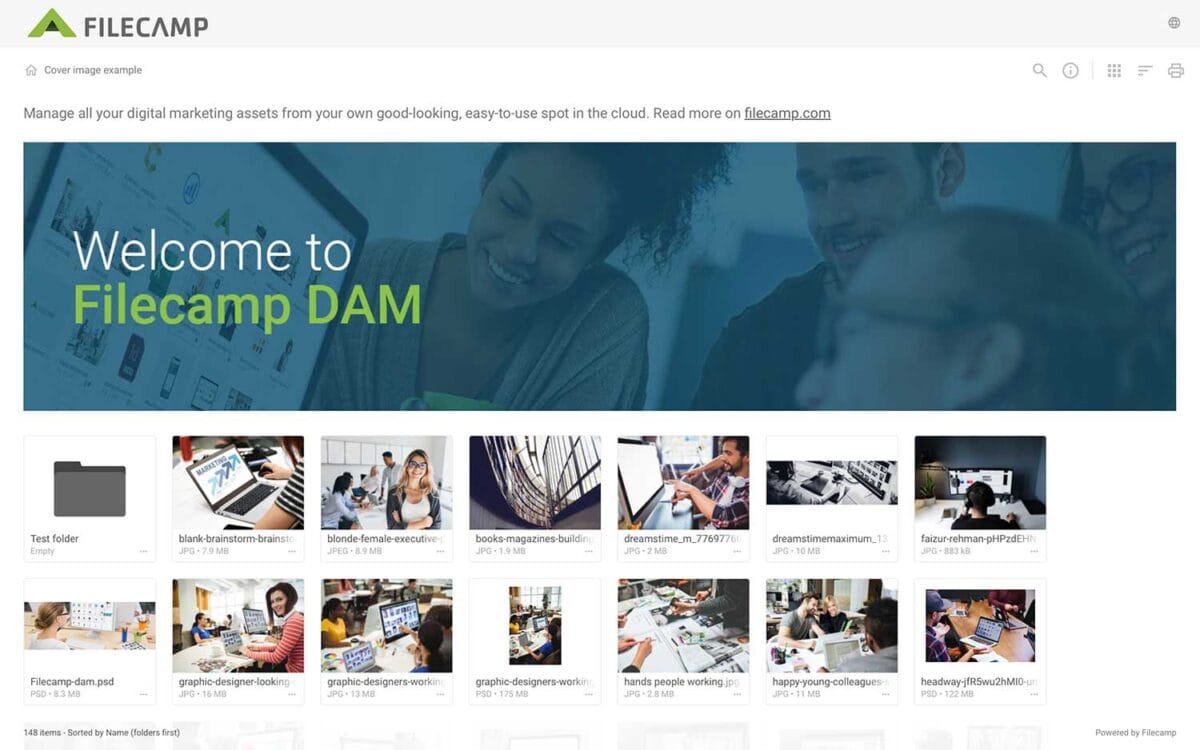
Banners
Banners Elevate your custom branding to new heights by adding personalized banners to your folders and collections. Add a banner To upload a banner, open the folder or collection and click the Info icon in the toolbar. Or select Info from the Three Dots Menu below a folder. This action opens the Infobar . Scroll down to the Advanced section, then click on the Banner image field to upload your banner image. We recommend using a well-compressed .jpg file with…
Acceptable Use Policy
…than our publicly supported interfaces (for example, “scraping” or creating accounts in bulk). Send unsolicited communications, promotions or advertisements, or spam. Circumvent storage space limits. Publish or share materials that are unlawfully pornographic or indecent, or that contain extreme acts of violence or terrorist activity, including terror propaganda. Violate the law in any way, including storing, publishing, or sharing material that’s fraudulent, defamatory, misleading, or violates the privacy or infringes the rights of others. Acceptable Use Policy You agree not…