
FILECAMP Guest Article Guidelines Our goal is to provide insightful and well-researched articles. We are open to high-quality Guest Articles on our blog. Filecamp.com currently has a Domain Rating of 76 according to Ahrefs! Getting Started These guidelines will provide you with everything you need to know to get started with your article. What kind of articles does Filecamp publish? Topics are loosely based on design, branding, and marketing. Topics include branding, marketing, freelancing, remote working, social media, content marketing, logo…
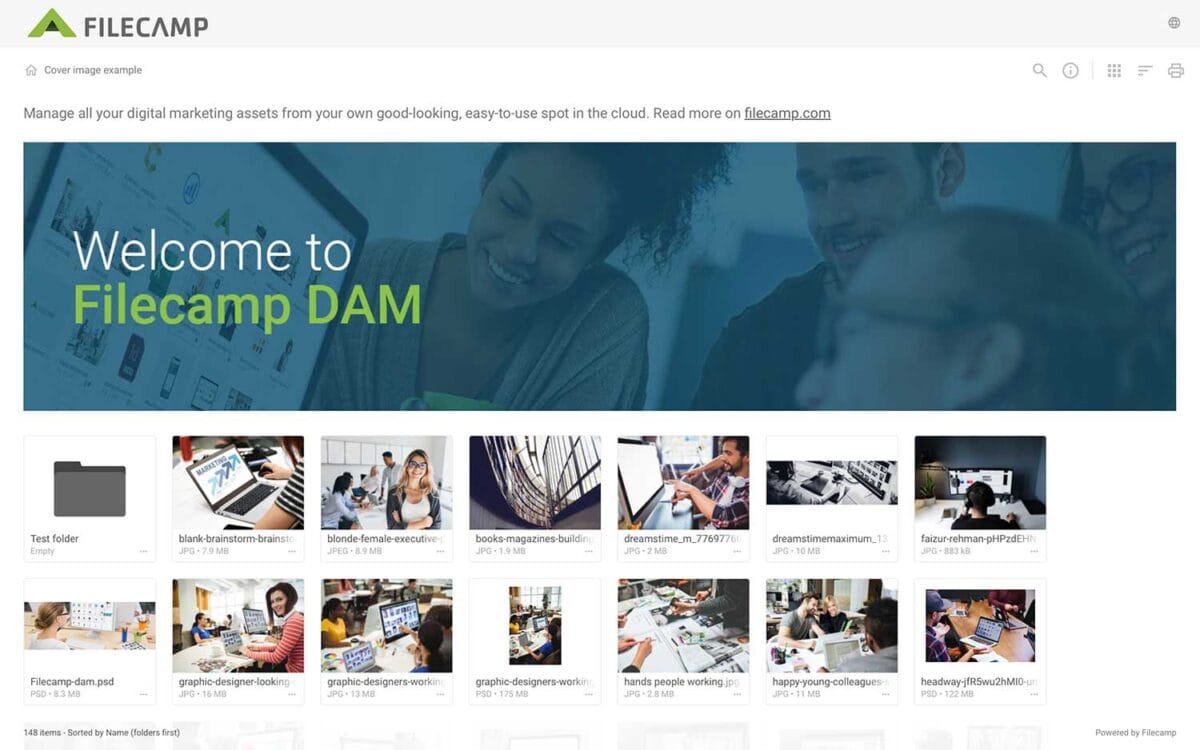
Banners
Banners Elevate your custom branding to new heights by adding personalized banners to your folders and collections. Add a banner To upload a banner, open the folder or collection and click the Info icon in the toolbar. Or select Info from the Three Dots Menu below a folder. This action opens the Infobar . Scroll down to the Advanced section, then click on the Banner image field to upload your banner image. We recommend using a well-compressed .jpg file with…
Supported file types
…batches – FFmpeg examines frames in batches of 100, comparing histograms to identify which frame best represents the visual content of that sequence. Select the best frame – The algorithm picks the frame that is most visually distinct and representative, avoiding motion blur, transitional frames, or poorly lit scenes. Smart fallback – For videos shorter than 10 seconds, the analysis starts from the beginning to ensure every video gets a quality thumbnail. Related articles Files Uploading files Downloading files…
Custom Branding
…https URL Login logo Login body background color Login page background image Your own custom Terms or copyright notice Secondary color (buttons etc.) White Label text Login description Login logo background color Your own custom fields for access requests. Interface You can see which aspects of the interface are customizable below: Favicon and page title Own secure https URL Logo Custom thumbnails on folders and files Folder description text Labels and Labelset Secondary color (buttons etc.) White Label text Default…
Create Collection
…a Collection and shares a download link with an agency. A graphic designer selects a few images for a new product brochure and requests feedback from the art director by inviting them to collaborate and comment. A salesperson creates a Collection of frequently used customer logos for quick access. A marketing team collaborates on a set of images, commenting and deciding which assets to use for a project. Related articles Collections Create Collection Edit Collection Share Collection links Delete Collection…
Notifications
…users change labels for files in the folder or any subfolder. Choose between No notification (default), Message notification, or Message & Email notifications. Comment notifications Get notified when someone adds comments to files in the folder or any subfolder. Choose between No notification (default), Message notification, or Message & Email notifications. Notification email example: No notification = You will not be notified (default). In-app notification = You will receive an in-app message. In-app & email notifications = You…
Receive files (without login)
…link should expire, or leave it set to Never expires. You can also customize the URL by clicking the pencil icon next to the link. Share the link You have two options for sharing the link: Copy link: Click Copy link and paste the link into an email, a message, your company’s website, or wherever you want to share it. Send by email: Enter the recipients’ email addresses, pressing Enter after each address. Add an optional message, then click Send….
Pages
…to create a simple page. But if you know HTML or have an existing HTML layout you’d like to use, feel free to put your design skills to work. To edit the HTML directly, click Tools > Source Code and add your code. Adding images to a Page Click the Insert/edit image button to insert an image/illustration to your page. In the Insert/edit image window you can enter an external link to the image or Choose an image file from…
Brand Guidelines
Brand Guidelines Creating & maintaining your brand guidelines should be simple, fast and fun. Filecamp helps businesses manage their digital assets and maintain brand consistency. Start my free trial! Start my free trial! Your own online brand portal An online Brand Guide ensures brand consistency and transparency with the public. No more emailing company logos, typeface and color codes. Filecamp’s Brand Manual allows you to manage, store and share your guidelines. Make sure your colleagues and partners…
Log in to Filecamp
Log in to Filecamp Access the login page for your Filecamp by typing the account URL into your browser. Log in Normally, the URL is : [YourCompanyName].filecamp.com. However, your company may use a custom URL. In this case you need to contact your system Administrators for the URL. On the login page, enter your username and your personal password. If you have forgotten the password, see Reset your password. Click Login or press ENTER. When you try to log in…
Keyboard shortcuts
…the previous item: ← Open/close the Infobar: i Open in full-screen mode: f Open/close Commenting: c Close preview: esc Save actions: ctrl (or cmd) + enter Drag actions: Drag files or folders to a different folder to move them. Hold the Alt (Option on Mac) key while dragging to copy instead of move. Drag files or folders from your computer into a folder to upload them. Tip: Press ? anywhere in Filecamp to open the keyboard shortcuts guide. …
Folder permissions
…A user can receive folder access through several Roles as well as direct folder access. Permissions from these assignments are combined. Permission sets: Permission sets define what users can do inside a folder. If a custom Permission set is changed, the change applies everywhere that Permission set is used. Parent folder access: Folder access is inherited by subfolders. If access is inherited from a parent folder, it must be changed from the folder where the access was originally assigned. No…