
…Filecamp for free. All features included. No obligation! Start my free trial No credit card required! Designed with your brand in mind Filecamp comes with some unique branding possibilities, and you can brand as many separate “sub-accounts” for your Filecamp as you’d like. You can customize the login page and overall logo and colors for each client to give them a unique experience that is centered on their brand. IMAGES Create an image gallery for your company images. Customize it…
Folder permissions
…a shared Role. Viewer access Viewer access lets users view folders and download files. Users with Viewer access can: View folders and files. Preview files. Download files. Add files to Collections. Create view-only or download share links. Comment on files, if commenting is enabled on the folder. Viewer access is best for users who only need to browse, review, or download files without changing anything. Editor access Editor access includes everything in Viewer access, plus permission to modify files and…
Screenshots
…Proofing & Commenting Log Filecamp has a simple logical design that makes sharing and collaborating on files and media online a breeze – online and from any device. Every plan includes custom branding so you can use your company logo and brand colors to make your Filecamp feel just like home!Our Advanced and Professional Plans include even more custom branding features so you can make your clients feel like they are right at home too! You also get features tailored…
Acceptable Use Policy
…network without Filecamp’s prior written permission. Breach, circumvent, or otherwise bypass any security or authentication measures. Transmit viruses, malware, malicious or destructive code, or other prohibited items through the Services. Prohibited items include any routine, device, or undisclosed feature, such as a time bomb, software lock, drop-dead device, worm, Trojan horse, trap door, back door, or malicious software routine, that is designed to: (1) delete, disable, deactivate, interfere with, or otherwise harm any software, program, data, device, system, or service;…
Filecamp status
…and do not see a notice posted, please contact us. NOTICE: Remember to clear all cache so that the code from the latest release is always in use. This will help you to avoid any potential errors. Past Incidents Certain links that are shared might be of an incorrect link type We have fixed the annoying “share link bug” we introduced with our update on September 2nd. The incident has been resolved. September 18, 2023 Notifications and invite emails were…
Photographers and Photography Studios
…can select, comment and approve your photos directly from their web browser. With online proofing, your projects keep moving forward. With all the features of Filecamp at a price you can afford, your business keeps moving forward too! Photo Studios especially benefits from: Custom branding. Share files while reinforcing your brand. Multiple themes. Create custom branded experiences for different clients. Easy to Use. Your clients and your team will love Filecamp´s simple, yet powerful interface. Online proofing. Online commenting and…
Downloading files
…last item. To select multiple non-consecutive files or folders using keyboard shortcuts: Press and hold Ctrl (control on Windows) or ⌘ (command on Mac). Click to select all the files or folders you want. When you have selected the files and folders you want to download click the Download button in the Bulk Action Bar. A .zip archive will then be created and the download process will begin. Download optimised image When downloading an image file, you can choose between…
White Label
…will then add your custom domain to the list of approved domains in our Page editor. Login page See below which aspects of the login page you can customize: Favicon and page title Own secure https URL Login logo Login body background color Login page background image Your own custom Terms or copyright notice Secondary color (buttons etc.) White Label text Login description Login logo background color Your own custom fields for access requests. Interface See below which aspects of…
Collections
…to a Download or Preview page. Share Collection [Download view] If you check the Download checkbox the recipients will be directed to a branded download page where the entire Collection can be downloaded as a zip archive. Share Collection [Preview view] If you check the Preview checkbox the recipients will be directed to a branded preview page where the content of the Collection can be previewed and downloaded. Example Use Cases You can add images and other files from different…
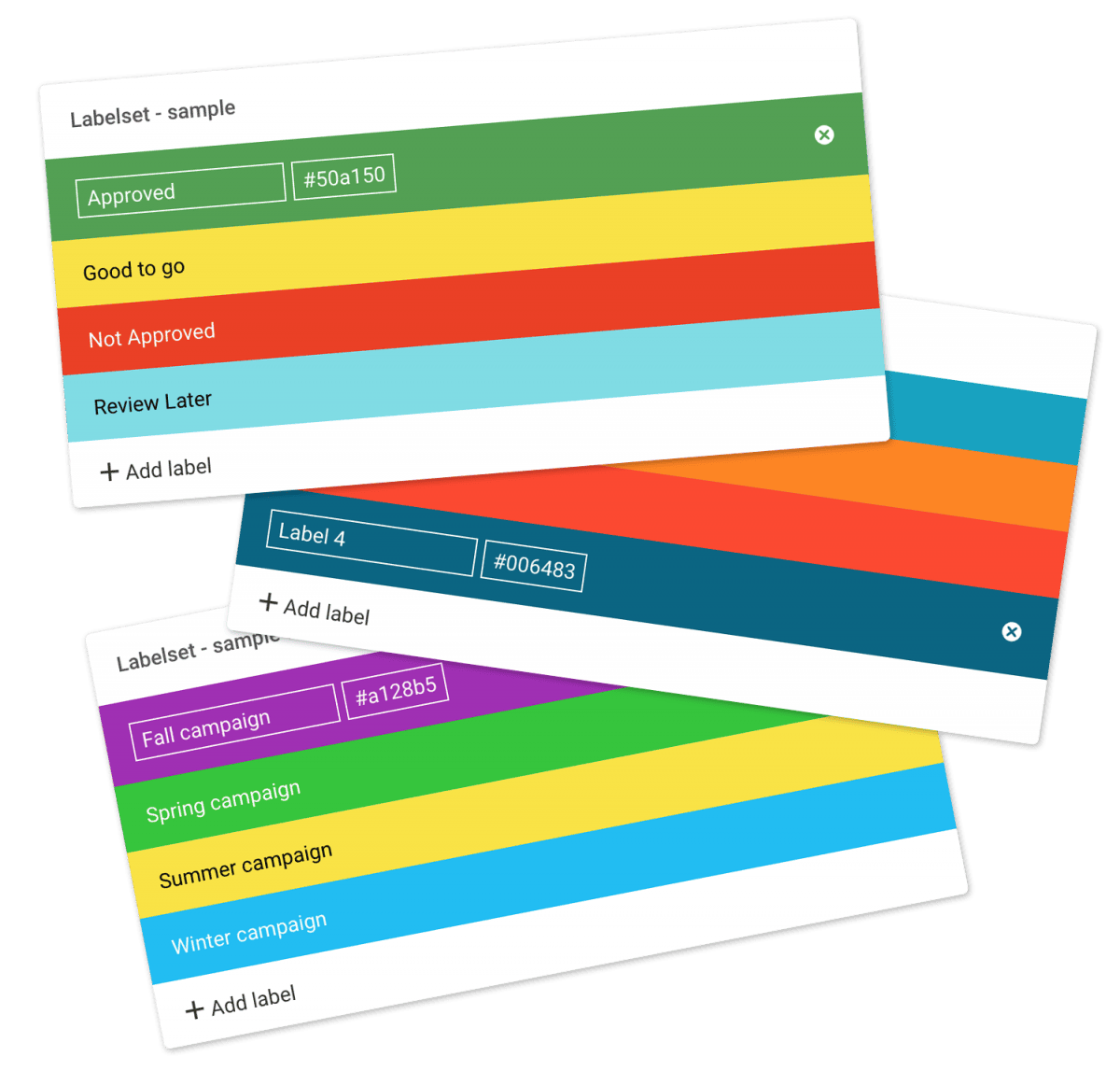
Using labels
Using labels Use colored labels for files and folders for easier indexing. Administrators can customize labels by changing the text and color associated with each. Assign a label to a file or folder (method 1) Click the Three Dots Menu below the file/folder thumbnail. Choose Label change. Now choose the label you want to use from the pop-up window. Assign a label to a file or folder (method 2) You can also change the label on a file from the…
User Interface Overview
User Interface Overview A quick overview of the menus and terminology used in Filecamp Main window Filecamp’s main window can include folders and/or file thumbnails. Grid View: Grid View displays your files and folders as a grid of thumbnails, offering a visual overview of your content. This layout is particularly useful for quickly identifying images and videos. List View: List View shows your files and folders in a row format with details like name, type, label, date, and size, making…
Digital Asset Lifecycle
…and up to date. 0.3 Distribute Providing the right kind of access is a big part of managing digital assets. A good DAM system allows roles and permissions to be assigned to users so that they see only what you want them to see. Most DAM systems also allow you to send download links to non-users to easily access specific files and folders. Most companies are sitting on a goldmine of images, stock photos, videos and other creative assets. A…