
…the cost Customize the Filecamp interface with your logo and brand colors. Create multiple themes and assign them to individual folders, giving each product, brand, or client a customized experience. Use a custom URL, such as “media.yourdomain.com”, and customize the login screen to match your brand. Remove Filecamp branding completely with the white-label option. Agencies can use this to offer clients a DAM platform under their own brand. There are many powerful, premium-priced enterprise Digital Asset Management (DAM) solutions on…
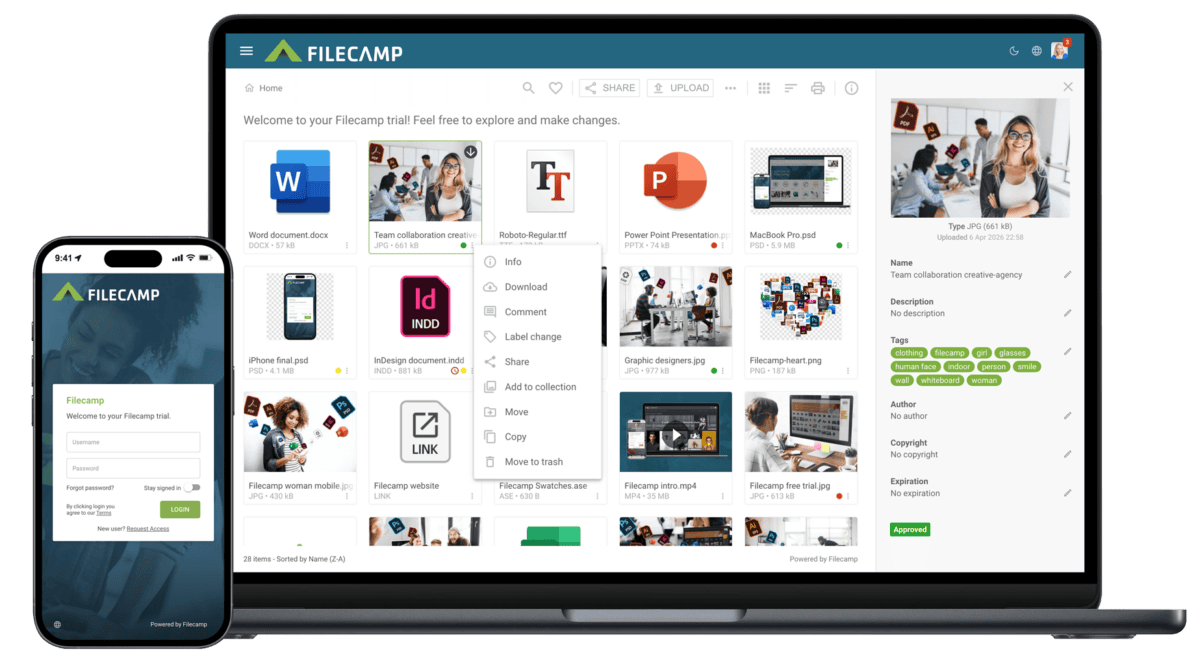
Bynder Alternative
…caption Watermarks Request file links Pages (WYSIWYG editor) Auto tags (automated tags) Labels White label Custom thumbnails Lowres download Commenting & markers Not markers. Activity log Trash feature Custom terms & conditions Branded login page Mobile ready/responsive UI Mobile app Version control Emails notifications Personalized URL (e.g. https://dam.yourcompany.com) Brand guidelines Access request Favorites Asset expiration Drag and drop uploads feature…
Privacy Policy
…law, you may have the right to request access to your personal data, as well as to seek to update, delete or correct this information. You can usually do this yourself in your Filecamp Account Settings or in the Edit User menu. And you are always welcome to contact privacy@filecamp.com for assistance. You can also unsubscribe from our marketing emails using the instructions provided in each email. Filecamp is compliant with GDPR standards. Further information related to Filecamp and GDPR…
Wiredrive Alternative
Looking for a Wiredrive alternative? Try Filecamp – the affordable Wiredrive alternative that comes with unlimited users in all plans. Start my free trial! Start my free trial! What makes Filecamp different. Discover how Filecamp can help you manage your digital assets more efficiently. Transparent pricing Filecamp’s pricing is 100% transparent and there are no initial costs or other hidden fees. Easy to use and intuitive Forget complex functionalities and complicated setups. Filecamp is Digital Asset Management right out-of-the-box. Self-service…
Professional Photo Database
…in batch or individually. With tags, your photos are easier than ever to find. Filecamp is a registered Adobe XMP partner. Online commenting Spend less time running around the office when you automate the collection of feedback and approvals on your company images. Keep your work moving forward with comments, markers, and automated notifications. Designed with your brand in mind Filecamp comes with some unique branding possibilities, and you can brand as many separate “sub-accounts” for your Filecamp as…
Features
…Easily manage all your files and control access and usage. Filecamp comes with unlimited users in all plans, so you don’t have to worry about price per user or other hidden costs. Learn more … Comment & Collaborate Unify your teams and keep them moving fast with online communication tools that allow commenting, real-time alerts and approvals. Learn more … Advanced download options Get the file format you need, when you need it. Download high-resolution PSD files from Adobe Photoshop or…
Filecamp & Sustainability
…by renewable energy and are designed to minimise energy consumption through advanced efficiency measures. Microsoft invests heavily in carbon reduction, renewable energy procurement, and environmental innovation. By using Microsoft Azure, Filecamp can further reduce its own carbon footprint. Microsoft is recognised as one of the world’s leading companies in sustainable cloud computing. These ongoing commitments make Azure a strong example of a modern, responsible, and sustainable IT infrastructure. Read more about Microsoft & Sustainability. What Does This Mean for Filecamp?…
Freelancers and Small Creative Companies
Industries Freelancers and Small Creative Companies Filecamp is an affordable file sharing and digital asset management platform for freelancers and small creative agencies. With Filecamp, you get a secure and affordable file sharing solution with powerful Digital Asset Management (DAM) features When you work as a freelancer or run a small creative company, you know that you have to make it easy for your clients to work with you. You have to be efficient, responsive, and professional. With Filecamp, you…
Own URL
Own URL With Filecamp, using your existing domain name (e.g., https://files.yourdomain.com) is easy and can be configured in a few minutes (Pro plan only). Get rid of Filecamp in your URL When you request a Filecamp Trial, a secure Filecamp sub-domain will be created for your account: https://companyname.filecamp.com. If you prefer to use your own domain address in the URL instead, you will have to create a corresponding CNAME record, for example: https://files.yourdomain.com or https://mediabank.yourdomain.com All Filecamp accounts are securely…
Knowledge Base
…Collection Share Collection links Delete Collection Labels Using Labels Commenting Start Commenting Invite users to comment Trash Trash Admin Billing General Domain Users Log Themes Labels Shares WebDAV Pages Tags Storage Subscription Billing overview Payment options Billing information & plan upgrades Signup & secure Trial Tech stuff Problem solving Browsers Filecamp Status Keyboard shortcuts Check out our Release Notes to learn about the latest updates. If you can’t find an answer in the Knowledge Base, please send an email…
Share folder (without login)
…folder name or text of your choice. Click the pencil icon next to the share link to edit it. Here is an example: Default share folder URL: https://files.company.com/s/o/z68FV3rkltUKyWoI Vanity share folder URL: https://files.company.com/s/o/imagebank Related articles Folders Create folder Edit folder Permissions Copy or move Delete Upload folder Share folder links Request files links Custom thumbnails Banners Embed via iFrame VIDEO SHARE FOLDER LINKS How to share a folder through a shared link, and what the recipients see. More videos…
General
…to the Trash. Read more about the Trash. Do not encode media files (saves storage space) – Filecamp normally creates browser-compatible versions of media files so they can be previewed. Enable this setting if you want to disable media encoding and save storage space. Read more about supported file formats. Enable commenting – enable or disable commenting across your Filecamp account. When disabled, users cannot comment on files. Enable labels – enable or disable Labels across your Filecamp account. When…