
…folders Select all files or folders you want. Then click the Label change icon in the Bulk Action Bar. Choose the label you want to assign to the items selected in the pop-up window. OBS: Administrators and users with permission to “Manage labels” can edit and create new Label sets in Admin > Labels. And the same users can turn Labels and Label changes on and off on folder level in the Edit Folder menu. Tip: Remember to turn on…
Sorting options
Sorting and viewing options All users can easily change the way files and folders are presented to them. Sorting options To change how items are sorted, click the Sort icon in the top-right corner. Then select one of the following sorting options: Name (folders first) – Sort alphabetically by name, with folders listed before files. Name (A–Z) – Sort alphabetically from A to Z. Name (Z–A) – Sort alphabetically from Z to A. Size (smallest first) – Sort by file…
Labels
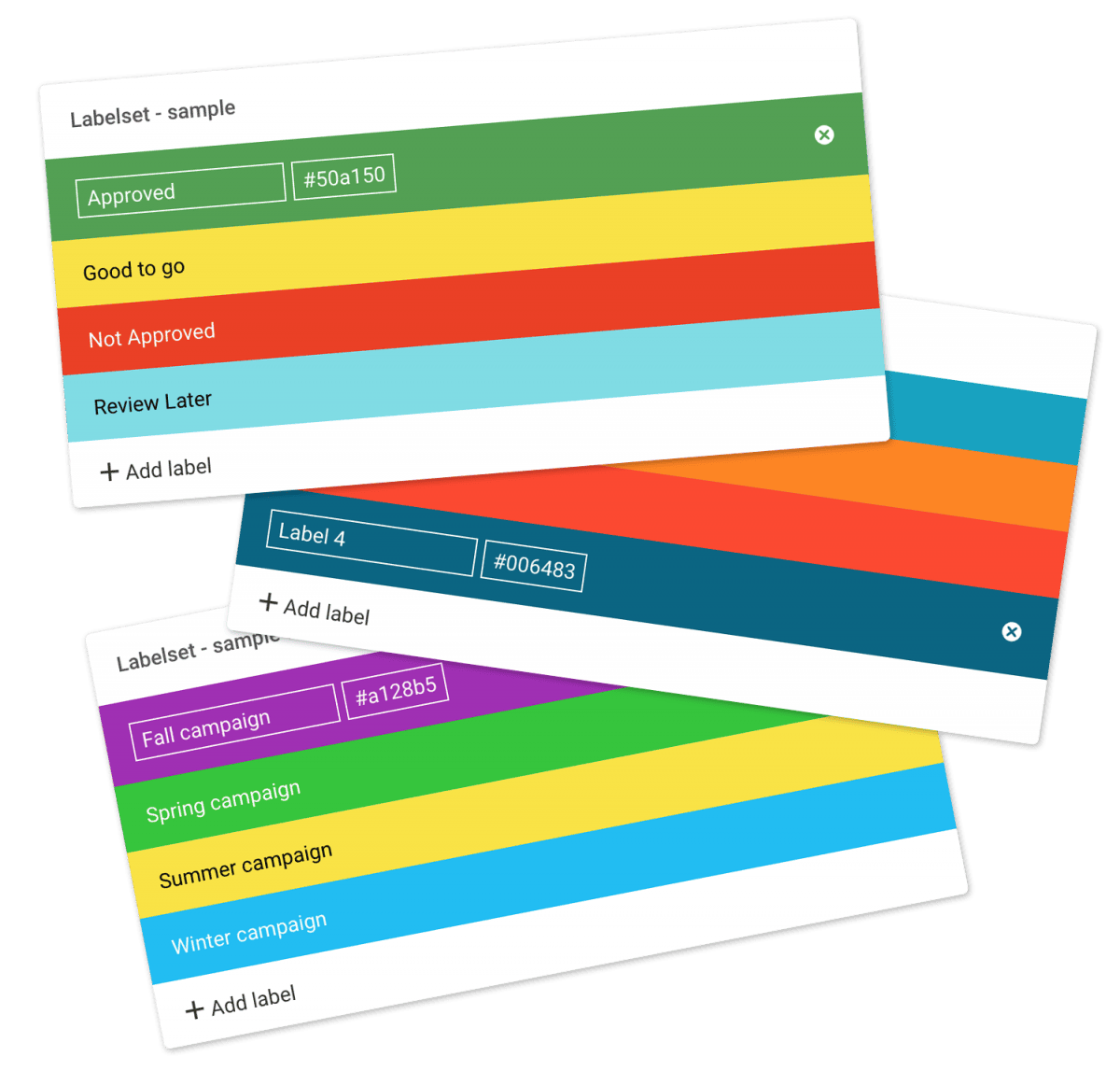
Create your own Labelsets For maximum flexibility your Admin level users can customize the labels by changing the text and color associated with each label and create new Labelsets. You can operate with unlimited Labelsets in all Filecamp plans. Read more. FEATURE HIGHLIGHT Labels Use colored labels for files and folders for easier indexing. Admin level users can customize the labels by changing the text and color associated with each label. Mark your files and folders with Labels.Using Labels…
Messages
…will see a list of all your messages sorted by date. The following notifications are displayed in your Outbox: Messages you have entered when sending shared links to files or folders. Notice: If you have unread messages the number of unread messages will be displayed in a round box over your avatar. Related articles User Edit My Profile Forgot password Remember me Notifications Log in Log out Language Admin Users Notice: You can disable notifications/messages for specific users. Read more. …
Log
Log The log is a powerful tool that keeps track of everything that happens in your Filecamp account. You can view, filter, and export activity reports to help keep track of your Filecamp usage. View the most recent activity on your Filecamp All Administrators and users with Log access have access to the Log file. To view the Log, access the Admin section from the main menu and choose Log. When someone signs in or out of your Filecamp, uploads,…
Create Collection
…a Collection and shares a download link with an agency. A graphic designer selects a few images for a new product brochure and requests feedback from the art director by inviting them to collaborate and comment. A salesperson creates a Collection of frequently used customer logos for quick access. A marketing team collaborates on a set of images, commenting and deciding which assets to use for a project. Related articles Collections Create Collection Edit Collection Share Collection links Delete Collection…
Remember me
…Filecamp. Disable Remember me (Automatic login) To disable the automatic login, just click the Log out button in the upper-right corner of your Filecamp account. You’ll then need to re-enter your username and password when you return to Filecamp. Notice: If you use Filecamp from a computer that other people have access to, automatic login may not be the best option. Related articles User My Profile Forgot password Notifications Log in Log out Language Dark and Light mode Admin Users…
Log in to Filecamp
Log in to Filecamp Access the login page for your Filecamp by typing the account URL into your browser. Log in Normally, the URL is : [YourCompanyName].filecamp.com. However, your company may use a custom URL. In this case you need to contact your system Administrators for the URL. On the login page, enter your username and your personal password. If you have forgotten the password, see Reset your password. Click Login or press ENTER. When you try to log in…
Screenshots
…Proofing & Commenting Log Filecamp has a simple logical design that makes sharing and collaborating on files and media online a breeze – online and from any device. Every plan includes custom branding so you can use your company logo and brand colors to make your Filecamp feel just like home!Our Advanced and Professional Plans include even more custom branding features so you can make your clients feel like they are right at home too! You also get features tailored…
Payment options
…plan upgrades Credit Card Management for recurring transactions Filecamp uses stripe, a Level 1 PCI Compliant service provider, to manage credit card data and PCI compliance. Filecamp only stores the absolute minimum card details such as the last four digits and the expiration date for identification purposes. Notice: Filecamp does not offer different pricing options for a yearly subscription as opposed to monthly. The reason is that invoice orders are managed by our staff manually, where recurring monthly payments by…
Signup & secure Trial
…articles Payment options Billing overview Billing information & plan upgrades Don’t have a credit card? No problem! You can also pay by yearly invoice. Invoice order payments can be made via Credit Card, Bank transfer, or PayPal. Notice: To signup and secure your Trial, you must be an Administrator! Credit Card Management for recurring transactions Filecamp uses stripe, a Level 1 PCI Compliant service provider, to manage credit card data and PCI compliance. Filecamp only stores the absolute minimum…
Tags admin
Tags The Tags admin section lets you view, edit, search and validate all tags applied to your files. View tags All administrators and users with Tags access can use the Tags section. To see the tags used in your account, open the Main menu and select Tags. You will see a list of every tag in your account. Each tag shows how many files it is applied to. This includes both manually created tags and AI-generated tags. Note: The tags…
