…Filecamp follows your operating system’s mode by default. If your device uses dark mode, Filecamp opens in dark mode. If it uses light mode, Filecamp opens in light mode. You can still switch modes at any time using the sun or moon icon. Related articles User My Profile Forgot password Remember me Notifications Log in Log out Language Admin Users Note: Dark and light modes only affect how Filecamp looks to you. They do not change anything for other users. …

Delete files or folders
How to delete files and folders Administrators and users with permission to “Move files & folders to trash” can delete files and folders. Delete a single file or folder Click the Three Dots Menu below the file/folder thumbnail and choose Move to trash. Or, open the file in large preview mode, click on Extra options in the Toolbar, and select Move to Trash. The file will be instantly removed from the folder and moved to the Trash. Delete multiple files…
Label set
…the Labelset drop-down menu. Enable/disable label change on folder level You can easily enable or disable label changes on the folder level. Enter the folder you want to modify, open the Infobar and click on Advanced settings in the, and you can now enable/disable label changes for this folder (and subfolders) from the Label Change drop-down menu. Notice: Only Administrators or users with permission to “Edit files and folders” and “Manage labels” can assign a Labelset to a folder. Read…
Language
…corner of the interface: From the dropdown menu, select the language you prefer. Filecamp supports multiple languages, including those most frequently requested by our users. Related articles User My Profile Forgot password Remember me Notifications Log in Log out Dark and Light mode Admin Users Supported Languages English Français Español Deutsch Nederlands Italiano Dansk Norsk Suomi Polski Português Svenska Русский 日本語 한국어 中文 If your preferred language isn’t listed, please don’t hesitate to contact us to suggest additional language support….
Edit My Profile
…but shouldn’t exceed 500×500 pixels. Notice: Only users who use their email address as their username can receive their login credentials through the Invite feature and reset their password using the Forgot Password option. For this reason, we strongly recommend using email addresses as usernames. Notice: Please observe the following Password security practices: Select a password that is easy for you to remember, but difficult for others to guess. Keep your password confidential and do not share it with anyone….
Domain propagation time
Domain propagation time All Filecamp accounts are configured on dedicated high-performance servers in your region. This is all good but means we have to deal with something called DNS propagation time. DNS propagation time We are managing all DNS on Amazon Route 53 which is designed to quickly propagate all DNS updates to its worldwide network of authoritative DNS servers within 60 seconds under normal conditions. But not all are normal conditions … and DNS changes can take anywhere between…
Forgot password
…If none of these steps resolve the issue, please let us know by sending an email to support@filecamp.com and list any email addresses that may be associated with your account. NOTICE: For security reasons the link in the Reset Password email will become invalid once you have clicked it, and/or if the password reset was requested more than 24 hours ago. Related articles User My Profile Remember me Notifications Log in Log out Language Dark and Light mode Admin Users…
Filecamp status
…our email-sending service (mandrillapp.com) over the last few days. Our team has identified and resolved the root cause but some email notifications and invites might have to be resent. The incident has been resolved. February 14, 2023 Unexpected downtime for certain US-based customers We have resolved an issue impacting one of our US-based servers. We apologize for the downtime this incident caused specific customers. The incident has been resolved and we have taken measures so that it can’t happen again. …
Filecamp Guest Article Guidelines
FILECAMP Guest Article Guidelines Our goal is to provide insightful and well-researched articles. We are open to high-quality Guest Articles on our blog. Filecamp.com currently has a Domain Rating of 76 according to Ahrefs! Getting Started These guidelines will provide you with everything you need to know to get started with your article. What kind of articles does Filecamp publish? Topics are loosely based on design, branding, and marketing. Topics include branding, marketing, freelancing, remote working, social media, content marketing, logo…
Request Files Links
Collect files from people with file requests Upload links can be used to receive files to your Filecamp without requesting the sender to log in. The possibilities are endless Add a Request Files link in your email signature and receive files directly in your Filecamp, without having to deal with mailserver file size limits. Add a Request Files link to your company website, and give your stakeholders a easy way to send you large files. Send out a business proposal…
Banners
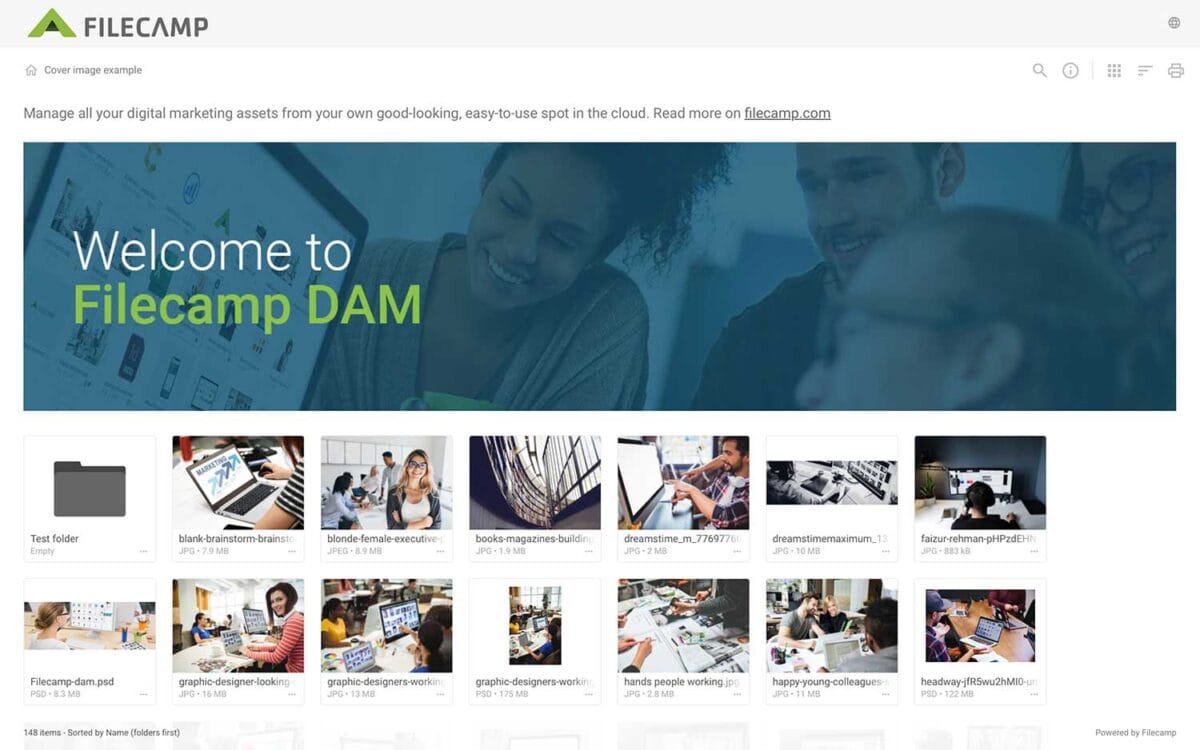
Banners Elevate your custom branding to new heights by adding personalized banners to your folders and collections. Add a banner To upload a banner, open the folder or collection and click the Info icon in the toolbar. Or select Info from the Three Dots Menu below a folder. This action opens the Infobar . Scroll down to the Advanced section, then click on the Banner image field to upload your banner image. We recommend using a well-compressed .jpg file with…
Acceptable Use Policy
…than our publicly supported interfaces (for example, “scraping” or creating accounts in bulk). Send unsolicited communications, promotions or advertisements, or spam. Circumvent storage space limits. Publish or share materials that are unlawfully pornographic or indecent, or that contain extreme acts of violence or terrorist activity, including terror propaganda. Violate the law in any way, including storing, publishing, or sharing material that’s fraudulent, defamatory, misleading, or violates the privacy or infringes the rights of others. Acceptable Use Policy You agree not…