
Filecamp Status Welcome to Filecamp’s status page. If there are any interruptions in service, it will be posted here. Current Incidents Today All systems are operational. Updated: October 4, 2026 Data centers | North America Operational Data centers | EMEA Operational Data centers | ASIA-PACIFIC (APAC) Operational Email notifications Operational Webdav Access Operational API Operational Support System Operational Marketing Website Operational Related articles Problem solving Release Notes If you are experiencing problems connecting to Filecamp…
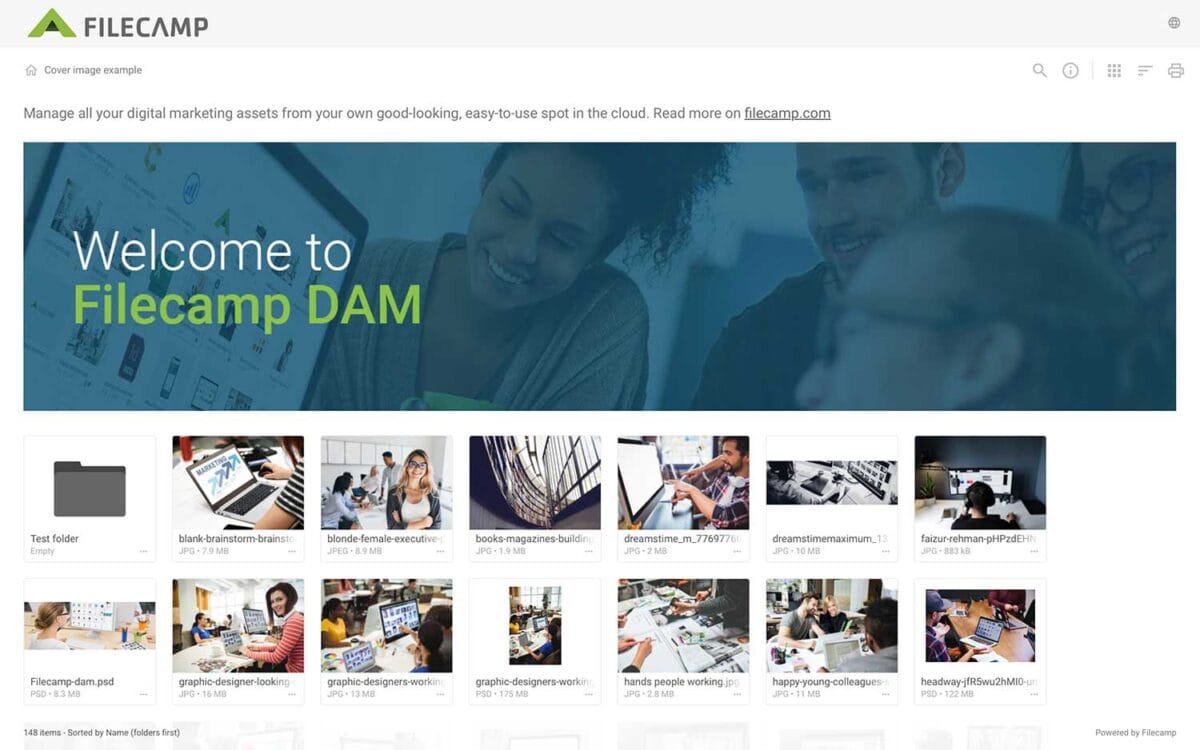
Banners
Banners Elevate your custom branding to new heights by adding personalized banners to your folders and collections. Add a banner To upload a banner, open the folder or collection and click the Info icon in the toolbar. Or select Info from the Three Dots Menu below a folder. This action opens the Infobar . Scroll down to the Advanced section, then click on the Banner image field to upload your banner image. We recommend using a well-compressed .jpg file with…
Case Studies
…“Filecamp gets the connection between accessibility and credibility. The design works because it’s simple and logical. When you’ve got people will all levels of technical skill using a system, it’s got to make sense.“ Deirdre Wilson, Director Hothouse Design Pty Ltd The best engineers are truly artists, yet when it comes to expressing themselves visually, […] Read more. Share your storyHelp us expand this resource by sharing your work and telling your story and how you benefit from Filecamp.Contact us!…
Supported file types
…than 20 GB, we recommend using WebDAV. Video / audio transcoding Video and audio files depend on browser plug-ins to play properly. If your video files are in .mp4/.m4a (H.264) format you are able to preview the original video/audio file directly in the browser. If your files are in another format/encoding, Filecamp encodes a copy of your video/audio file to ensure that your video/audio file can be previewed in a browser and on all devices. This copy is used for…
Custom Branding
…https URL Login logo Login body background color Login page background image Your own custom Terms or copyright notice Secondary color (buttons etc.) White Label text Login description Login logo background color Your own custom fields for access requests. Interface You can see which aspects of the interface are customizable below: Favicon and page title Own secure https URL Logo Custom thumbnails on folders and files Folder description text Labels and Labelset Secondary color (buttons etc.) White Label text Default…
Create Collection
…a Collection and shares a download link with an agency. A graphic designer selects a few images for a new product brochure and requests feedback from the art director by inviting them to collaborate and comment. A salesperson creates a Collection of frequently used customer logos for quick access. A marketing team collaborates on a set of images, commenting and deciding which assets to use for a project. Related articles Collections Create Collection Edit Collection Share Collection links Delete Collection…
Notifications
Notifications Stay informed about new activity in your Filecamp account with notifications. Notifications and in-app messages Get notified when specific actions take place in the folder or folders you have access to. Navigate to the relevant folder and select Folder notifications from the Toolbar. Related articles User My Profile Forgot password Remember me Log in Log out Language Dark and Light mode Admin Users Administrators can set up notifications for other users by using the Log in as another user…
Receive files (without login)
Request files link Invite anyone to upload files to your Filecamp account — no login required. Request files links are why many teams use Filecamp as an FTP alternative for receiving large files. Create a Request files link Users with permission to share files and folders can create a Request files link. Navigate to the folder where you want to receive files, then click the Share button in the Toolbar. Under Type, select Request files. Under Expiration, choose when the…
Pages
…page in Microsoft Word or PowerPoint you can also create a page in Filecamp. Pages can be modified via HTML but if you don’t know anything about coding you should stick with the WYSIWYG editor, or ask a web designer for help. This article reviews the following topics: Add Custom Page Edit a Page Share Page Assign a Page to a folder Related articles Billing General Domain Users Log Themes Labels Shares WebDAV Pages Tags Storage Custom pages are flexible…
Multiple themes
…sub-accounts to their clients.Large corporations with multiple brands can create branded folders for each brand. This will make it very clear for all stakeholders which brand you entering.Architects can create a new theme for each project they are working on.More use case? Please let us know. Your brand, your DAM!The following examples show how easy it is to create custom branded experiences for different clients using Filecamp’s multiple themes feature. All the screenshots are from the same Filecamp account,…
Brand Guidelines
Brand Guidelines Creating & maintaining your brand guidelines should be simple, fast and fun. Filecamp helps businesses manage their digital assets and maintain brand consistency. Start my free trial! Start my free trial! Your own online brand portal An online Brand Guide ensures brand consistency and transparency with the public. No more emailing company logos, typeface and color codes. Filecamp’s Brand Manual allows you to manage, store and share your guidelines. Make sure your colleagues and partners…
Log in to Filecamp
Log in to Filecamp Access the login page for your Filecamp by typing the account URL into your browser. Log in Normally, the URL is : [YourCompanyName].filecamp.com. However, your company may use a custom URL. In this case you need to contact your system Administrators for the URL. On the login page, enter your username and your personal password. If you have forgotten the password, see Reset your password. Click Login or press ENTER. When you try to log in…