
…but shouldn’t exceed 500×500 pixels. Notice: Only users who use their email address as their username can receive their login credentials through the Invite feature and reset their password using the Forgot Password option. For this reason, we strongly recommend using email addresses as usernames. Notice: Please observe the following Password security practices: Select a password that is easy for you to remember, but difficult for others to guess. Keep your password confidential and do not share it with anyone….
Delete files or folders
How to delete files and folders Administrators and users with permission to “Move files & folders to trash” can delete files and folders. Delete a single file or folder Click the Three Dots Menu below the file/folder thumbnail and choose Move to trash. Or, open the file in large preview mode, click on Extra options in the Toolbar, and select Move to Trash. The file will be instantly removed from the folder and moved to the Trash. Delete multiple files…
Domain propagation time
Domain propagation time All Filecamp accounts are configured on dedicated high-performance servers in your region. This is all good but means we have to deal with something called DNS propagation time. DNS propagation time We are managing all DNS on Amazon Route 53 which is designed to quickly propagate all DNS updates to its worldwide network of authoritative DNS servers within 60 seconds under normal conditions. But not all are normal conditions … and DNS changes can take anywhere between…

Language
…corner of the interface: From the dropdown menu, select the language you prefer. Filecamp supports multiple languages, including those most frequently requested by our users. Related articles User My Profile Forgot password Remember me Notifications Log in Log out Dark and Light mode Admin Users Supported Languages English Français Español Deutsch Nederlands Italiano Dansk Norsk Suomi Polski Português Svenska Русский 日本語 한국어 中文 If your preferred language isn’t listed, please don’t hesitate to contact us to suggest additional language support….
Tag manager
Tags The Tags admin section lets you view, edit, search and validate all tags applied to your files. View tags All administrators and users with Tags access can use the Tags section. To see the tags used in your account, open the Main menu and select Tags. You will see a list of every tag in your account. Each tag shows how many files it is applied to. This includes both manually created tags and AI-generated tags. Note: The tags…
Dark and Light mode
…Filecamp follows your operating system’s mode by default. If your device uses dark mode, Filecamp opens in dark mode. If it uses light mode, Filecamp opens in light mode. You can still switch modes at any time using the sun or moon icon. Related articles User My Profile Forgot password Remember me Notifications Log in Log out Language Admin Users Note: Dark and light modes only affect how Filecamp looks to you. They do not change anything for other users. …
Forgot password
…If none of these steps resolve the issue, please let us know by sending an email to support@filecamp.com and list any email addresses that may be associated with your account. NOTICE: For security reasons the link in the Reset Password email will become invalid once you have clicked it, and/or if the password reset was requested more than 24 hours ago. Related articles User My Profile Remember me Notifications Log in Log out Language Dark and Light mode Admin Users…
Request Files Links
Collect files from people with file requests Upload links can be used to receive files to your Filecamp without requesting the sender to log in. The possibilities are endless Add a Request Files link in your email signature and receive files directly in your Filecamp, without having to deal with mailserver file size limits. Add a Request Files link to your company website, and give your stakeholders a easy way to send you large files. Send out a business proposal…
Filecamp status
…unavailable for some customers We’ve had some issues with our email-sending service (mandrillapp.com) over the last few days. Our team has identified and resolved the root cause but some email notifications and invites might have to be resent. The incident has been resolved. February 14, 2023 Unexpected downtime for certain US-based customers We have resolved an issue impacting one of our US-based servers. We apologize for the downtime this incident caused specific customers. The incident has been resolved and we…
Filecamp Guest Article Guidelines
FILECAMP Guest Article Guidelines Our goal is to provide insightful and well-researched articles. We are open to high-quality Guest Articles on our blog. Filecamp.com currently has a Domain Rating of 76 according to Ahrefs! Getting Started These guidelines will provide you with everything you need to know to get started with your article. What kind of articles does Filecamp publish? Topics are loosely based on design, branding, and marketing. Topics include branding, marketing, freelancing, remote working, social media, content marketing, logo…
Banners
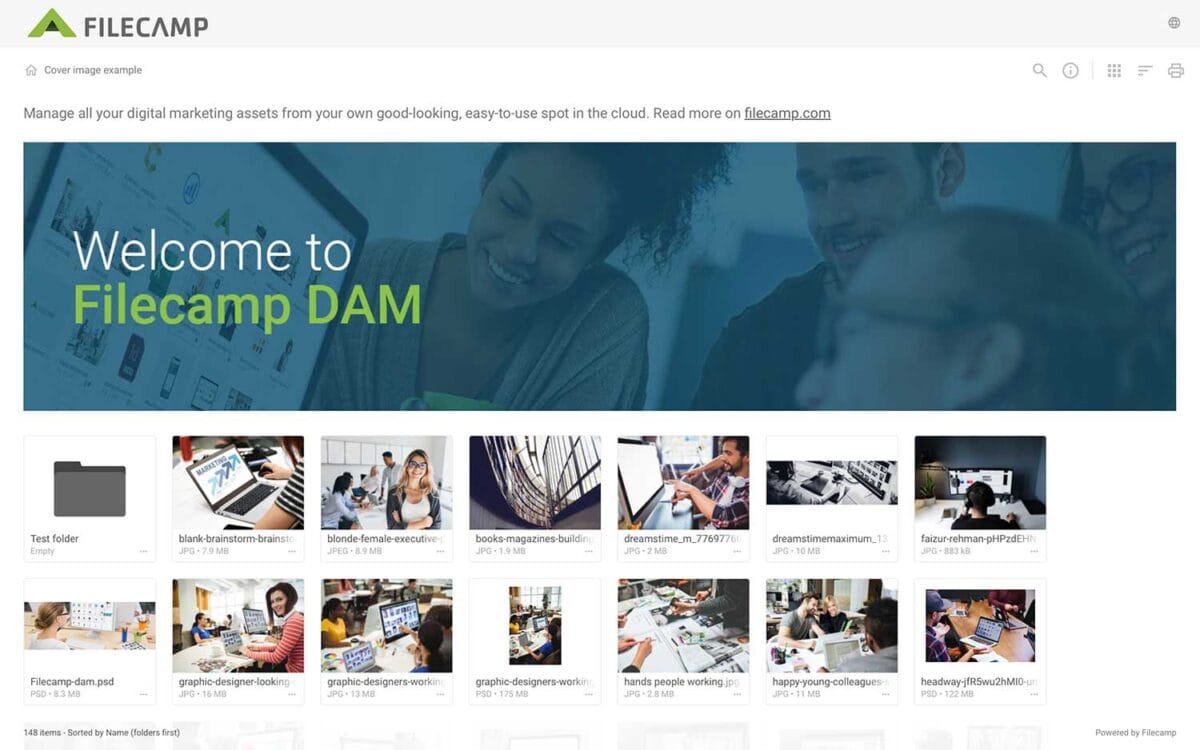
Banners Elevate your custom branding to new heights by adding personalized banners to your folders and collections. Add a banner To upload a banner, open the folder or collection and click the Info icon in the toolbar. Or select Info from the Three Dots Menu below a folder. This action opens the Infobar . Scroll down to the Advanced section, then click on the Banner image field to upload your banner image. We recommend using a well-compressed .jpg file with…
Case Studies
Share your story Help us expand this resource by sharing your work and telling your story and how you benefit from Filecamp. Contact us! Case Studies Whether you’re looking for inspiration or precedents, Filecamp´s Case Studies are a perfect place to start. TRUE “… for a design agency to succeed it not only has to do good work, it has to look good doing it.” Mark Christensen, Partner at TRUE™, truecph.com In today’s world, a brand needs to represent itself…