
…link should expire, or leave it set to Never expires. You have two options for sharing the link: Copy link: Click Copy link and paste the link into an email, a message, your company’s website, or wherever you want to share it. Send by email: Enter the recipients’ email addresses, pressing Enter after each address. Add an optional message, then click Send. To preview the shared page, click the Open in new window icon. Anyone with the link can access…
Box.com Alternatives
…brand. To the top Public Download Links One feature that is common to Box.com and similar file sharing platforms, is the ability to send “public links”. These are links to files and folders that have been uploaded to the file sharing platform. The reasons they are called “public links” is because they are links that you can email or send to people outside your business who many not have login credentials for your file sharing platform. The link makes it…
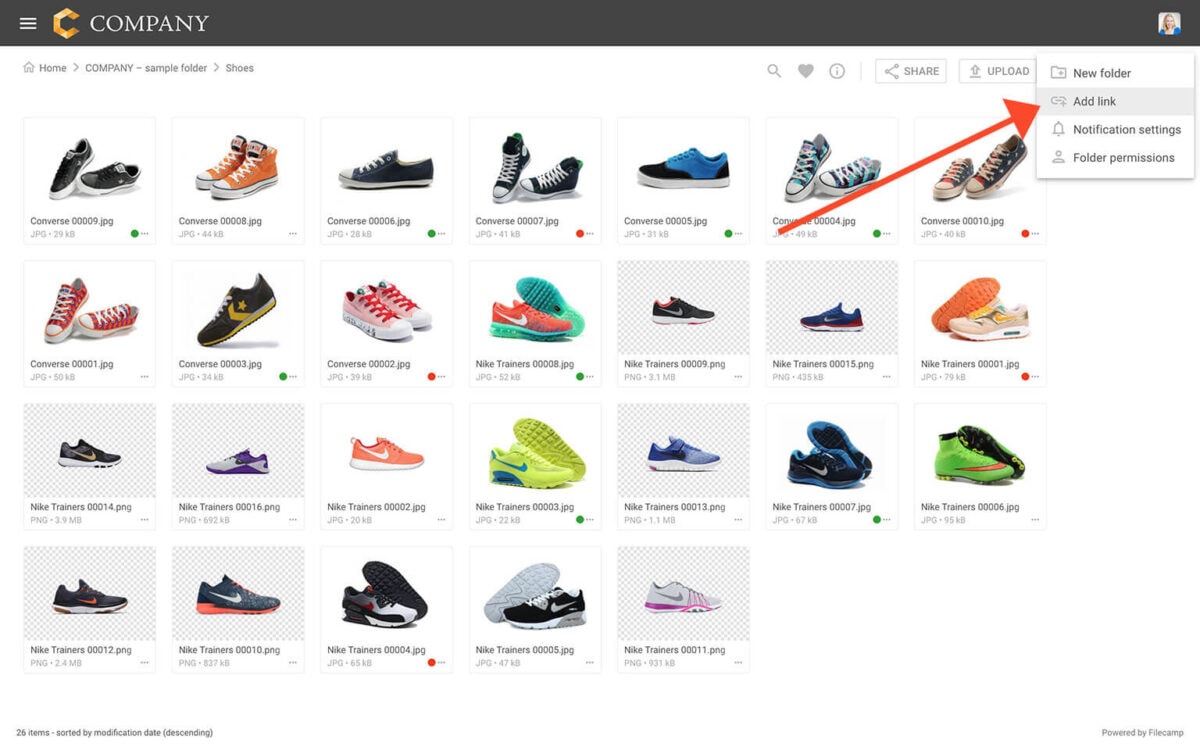
Add link
…choose what the LINK file should point to. Link to a web address Select Web address under Link to. Enter the full URL you want the LINK file to point to. Then choose how the link should open: New browser tab Same browser tab Pop-up window Click SAVE when you’re done. Link to a Filecamp item Select Filecamp item under Link to. You can link directly to: A Filecamp file A Filecamp folder A Page Choose the destination and then…
Dropbox Alternative
…which does offer white label functionality. Filecamp allows users, at no additional cost, to remove the Filecamp brand completely and make the file sharing platform appear to be completely their open. This enables creative businesses to frame the entire third party file sharing solution under their company brand. To the top Public Download Links A standard feature across “Dropbox for Business” and all alternative file sharing solutions, is the ability to send “public links”. These are links to files or…
Share folder (without login)
…string in a share URL with the folder name or text of your choice. Click the pencil icon next to the share link to edit it. Here is an example: Default share folder URL: https://files.company.com/s/o/z68FV3rkltUKyWoI Vanity share folder URL: https://files.company.com/s/o/imagebank Related articles Folders Create folder Edit folder Permissions Copy or move Delete Upload folder Share folder links Request files links Custom thumbnails Banners Embed via iFrame VIDEO SHARE FOLDER LINKS How to share a folder through a shared link,…
Release notes
…copied more efficiently. Bug fixes Fixed some minor bugs in our recently upgraded Link feature. Fixed an issue where folders with names starting with a space could not be uploaded. Direct file links to .mov files now work again. August 22, 2026 What’s new We’ve improved Link files. You can now edit where they point to and choose whether they open in the same tab, a new tab, or a pop-up window. Link files can now also point to…
Knowledge Base
…Account Settings. How do I send large files through email using Filecamp? Instead of attaching the file to your email, you can just upload it to your Filecamp account. Filecamp will automatically create a link that you can use to share via email. You can choose to send the link directly from Filecamp or paste the link into your favorite email application. People who receive the link will be directed to a branded download page featuring your company logo and…
Media Library Software
…Roles and folder permissions let you control which folders users can access and whether they can view or edit the content. Keep permissions simple or create more detailed access rules for complex teams and workflows. One-click send and share Share files, folders, and Collections with colleagues, clients, and external partners without leaving your workspace. On the Professional plan, invite comments with point markers, and keep every conversation next to the file it is about. Public links and private folders Create…
Receive files (without login)
…link should expire, or leave it set to Never expires. You can also customize the URL by clicking the pencil icon next to the link. Share the link You have two options for sharing the link: Copy link: Click Copy link and paste the link into an email, a message, your company’s website, or wherever you want to share it. Send by email: Enter the recipients’ email addresses, pressing Enter after each address. Add an optional message, then click Send….
Brand Portal
…each user only sees the folders their role allows. Can the portal run on our own domain without Filecamp branding? Yes, on Professional: your domain with SSL included, and your company name in the footer. Can a portal be public or private? Both. Share links make selected folders public to anyone with the link; everything else needs a login. Links cannot carry a password. How much does it cost? From $29 a month with unlimited users. A portal on your…
Shares
Shares Administrators and users with permission to “Manage Shares” can monitor, edit, and delete shared links from one central location. Manage shared links Go to Admin > Shares. You will now see a complete list of all the shared links your users have created. Search for a shared link Go to Admin > Shares. Type in anything related to the shared link. Press Enter to execute the search. Edit or reshare a shared link Click on any of the shares…
Quick Start Guide for new Users
…clicking on them.) Select the specific file(s) and click the Open button. Click the Start Upload button. When the upload process is finished, click Done and you will be directed to the folder where you can see the uploaded files. Read more about upload. STEP 6 – Shared links Shared links provide an additional way to share folders or files with others. With shared links, the user does not need to be added to your Filecamp. Share files with shared…