

Your Brand Has a File Problem:
Why Teams Keep Re-Creating the Same Assets
"Do we have this?" You've heard that one before, probably a lot. If you ask it frequently, you're certainly not alone.
What technically occurs is that your brand has a tremendous amount of duplicate files, from logos, product photography, pitch decks, and email templates. However, your employees continue to redraft logos, rebuild slide presentations, or re-export the same Hero Image in six different sizes because they can't find the original.
And, you understand what follows? It's frustrating. It hinders every phase of your workflow. And, it quietly eats away at morale. The mental anguish of realizing you recreated a copy of the same file you spent six hours creating is the worst part of the experience.
Also consider the wasted time and money, in addition to the frustration. Every duplicated process is a lost opportunity for innovation or customer service. Eventually, inefficiency from constantly redoing things becomes normalized in your team's work culture.
In this article, we'll explore how to prevent this duplication of files and why it is critical for modern companies.
Why This Is a Critical Issue for Modern Brands
Speed and consistency are now more important than ever for companies today.
However, when files are scattered throughout hard drives, email inboxes, and older file-sharing tools, both speed and consistency suffer. Delays occur when a team member has to create a file he or she did not know existed. According to McKinsey, the average knowledge worker spends approximately 19% of his/her time merely looking for information.
That is approximately a full day per week, and totals to 52 days annually.
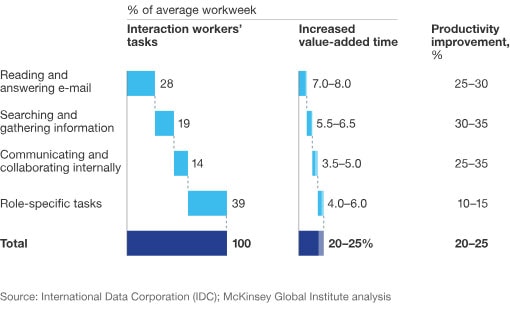
It's interesting to note, however, that implementing solutions to manage data centrally, and to reduce the need to search for and replicate or duplicate existing files can improve productivity by 30 to 35 percent. Therefore, if your team's productivity is suffering from file management issues, you have your answer.
Additionally, there's the issue of content waste. A significant portion of created content is never utilized. It is not because the content is poor quality but because the teams cannot locate it, do not trust it, or do not even know it exists. Consequently, they produce a new piece of content, which may also be lost among the numerous other pieces.
This same fragmentation not only affects creative files. Legal, finance, and operations teams feel it as well. When documents like agreements, approvals, and renewals are scattered across inboxes and shared drives, teams lose confidence in which version is current. That is why many organizations adopt a dedicated contract management system to centralize contracts, track versions, and maintain a single source of truth.
What Causes Replication of the Same Assets?
According to Stanislav Khilobochenko, VP of Customer Services at Clario, “Duplicate asset creation is typically not accidental. It is a shortcut. First, someone needs to obtain a logo fast. Or a slide deck is due in an hour, and a product image is missing when it is needed the most. Next, the thought occurs. It would be easier to create a duplicate of the file than to find it. After a while, this becomes the norm for a team.”
There are several structural problems that lead to this type of behavior being virtually unavoidable, and they include:
-
No Centralized File Management System
Decentralized storage is typically the root cause of this problem.
One team stores files in Drive, another uses a shared server or a file-sharing tool for communication, and a third stores files locally on their desktop computers or in an older version of Dropbox. As a result, there is no single location of the truth, so your team creates duplicate assets because it appears easier than locating the original in multiple locations.
At first, when your log consists of fewer than a dozen files, this is not a problem. However, as your business grows and the number of files increases, the convenience of decentralized storage quickly becomes data fragmentation.
This problem becomes even more visible in teams that frequently work with visual assets. Think of marketing or operations teams responsible for customized apparel or other wearables
Without a central place to store approved logo files, color codes, and design templates, every new request starts from scratch. A designer redraws a logo. Someone exports a slightly different version for print. Another person tweaks sizing or colors to speed up the process. The result is multiple versions of what should be a single, trusted asset.
-
Weak Version Control Procedures
A designer creates a file and labels it "final" in order to indicate that it is complete. An individual from another group makes a slight modification, but wants to preserve the original, so they save a new copy and label it "final 2". Another modification is required, so an additional "final final" is added to denote that this is the newest version.
This is a weak version control system because you allow filenames to determine version history instead of using a shared system where everyone on the team can view which files were modified, by whom, and when.
As a result, your team is confronted with a labyrinth of duplicates, incomplete edits, and well-meaning quick fixes that stray from brand standards. That is how one asset can become many, and none of them are considered to be trustworthy.
-
Silos Between Departments
Even when storage and versioning are not the primary reasons, departmental silos can be. If marketing does not know which product has already been completed, or if sales does not know what marketing recently approved, each team will begin creating their own copy of the same file.
This is referred to as the visibility gap, in which one team is unaware of the other team's actions.
Conversely, when teams can see what exists and what is in development, they cease to reproduce the same thing and begin to develop upon the work of others.
How Can Poor File Management and Duplication Cost Your Business?
File duplication is perceived as minor when it first occurs, but the damage it causes accumulates over time. Here are some examples of how poor file management can harm your business.
-
Operational Inefficiencies
Hundreds of hours are spent recreating assets that will never appear in a project plan. Although teams may seem productive, they are engaged in busywork in a more fashionable attire by reproducing what already exists, rather than making meaningful contributions.
When you multiply these lost hours by a quarter or a year, the result is missed deadlines and employee burnout. Additionally, there is the concept of the productivity illusion. Your designers are producing designs, but if the productivity is incorrect, their production remains static.
-
Financial Implications
The financial consequences of duplication manifest in two ways: on the income statement and in lost opportunities. Consider redundant labor, where you pay twice or even three times for the same creative work.
There is also the factor of infrastructure bloat, where you invest in higher-cost cloud storage and additional software licenses to support thousands of files, half of which are duplicates. Furthermore, every disorganized file search results in delayed campaigns or product launches, thereby pushing revenue into the future.
-
Effects on Brand Consistency and Quality
Inconsistent assets confound your designers and your customers. Each variation of color, outdated logo, or disparate messaging diminishes the reliability of your brand. How will you explain to a customer that the inconsistency between your brand assets resulted from a file discrepancy or a lack of proper duplication?
According to research, 89% of businesses have reported an increase in revenue as a direct result of consistent branding, and 33% of respondents have characterized that increase as substantial.
The simple reason is that customers expect consistency. It signals reliability and helps them trust your brand and remain loyal.
Conversely, if you allow poor file management and duplication to persist, your revenue will likely decline.

3 Ways to Implement Effective File Management and Avoid File Duplication
Poor file management and recurring duplication can severely hinder your business processes, ultimately affecting your revenue. Now, let's examine three approaches to avoid this.
-
Implement Centralized Digital Asset Management (DAM)
A centralized DAM provides a common repository for accessing approved assets. Instead of having multiple tools and individual file repositories, your team members can easily access all company-approved assets, including logos, templates, images, videos, and documents in a single, shared location.
Take a telehealth company offering online consultation services as an example. With a DAM system in place, teams can easily access the latest intake forms, consent documents, and patient communication templates. This consistency supports smoother care delivery, clearer communication, and a more reassuring experience for patients throughout their journey.
To make this effective:
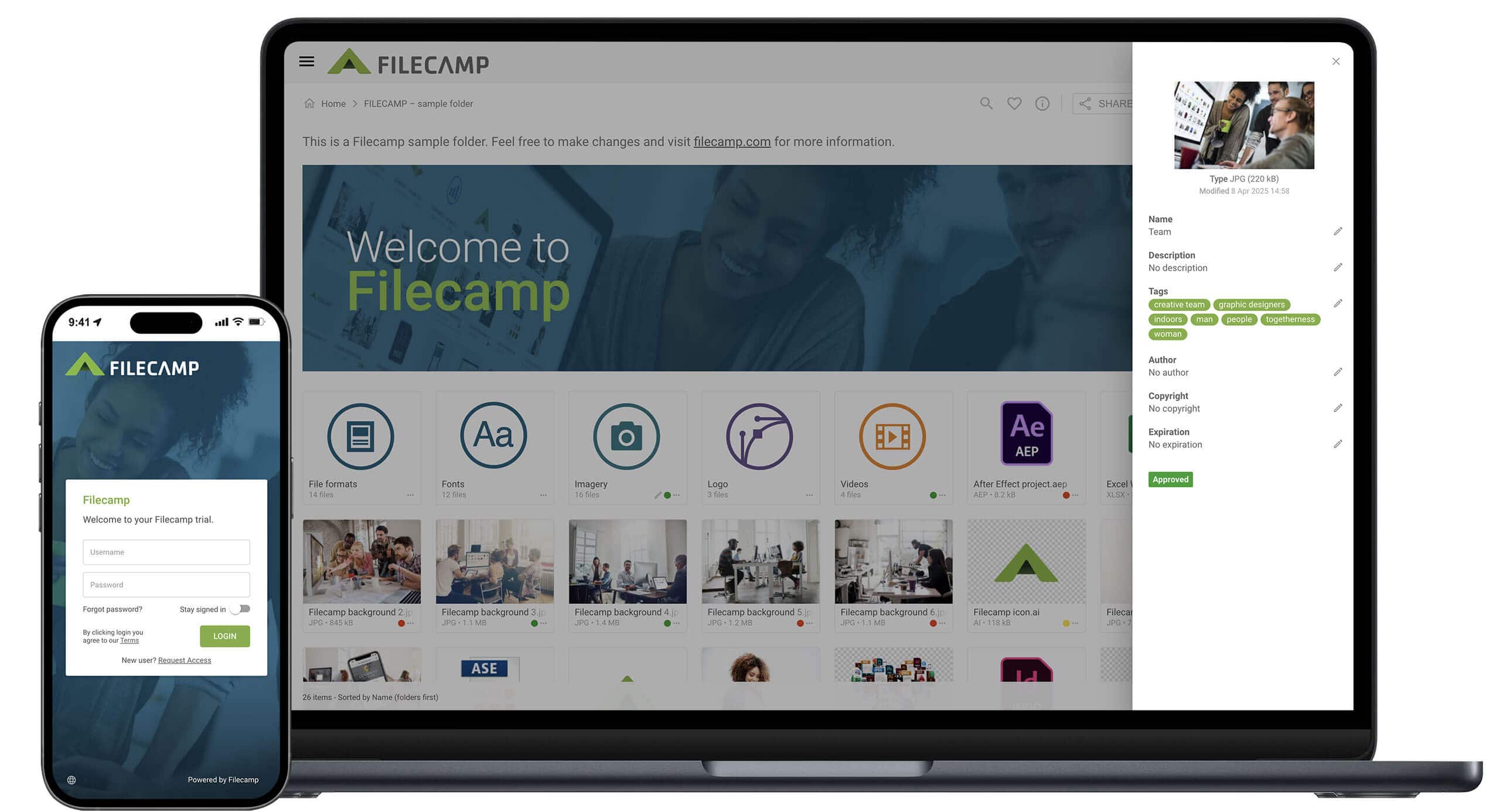
- Obtain access to a reputable DAM system, such as Filecamp that allows centralized management of your digital assets
- Begin with a small set of files, particularly those that are frequently accessed, and move only those to the new system
- Identify clear ownership of the assets to ensure that someone is accountable for maintaining the accuracy and currency of the assets
- Utilize simple folder and tag structures that mirror the way your teams search for assets, and not based on the organizational structure of your company
- Prioritize the migration of the highest value assets first
- Train your team on the procedures for uploading and approving assets in a standardized and repeatable manner
Above all, establish the DAM as the preferred starting point for all new work, and not as an archival repository.
-
Adoption of Robust Version Control
Good version control empowers your team to stop wondering which version of a file is correct, since the system will provide that information. They will be able to observe the changes that were made, the date the changes were made, and who authorized the changes.
The transparency will promote trust and reduce the reliance on personal duplicates.
Implementation does not require a massive overhaul of your processes:
- Utilize platforms that automatically record version histories instead of relying on filename versions. For example, utilize Google Docs and Slides for presentations, and Filecamp's DAM for versioning of all files
- Integrate your design tools with your asset library. For example, link your design applications to your DAM so that approved logos and brand colors can be referenced via shared libraries
- Establish a clear indication of approval, such as a status label or a version lock. In practice, a status label can consist of labels that are applied directly to the asset in the DAM, such as Draft, In Review, or Approved
- Restrict who can approve the final version, while permitting teams to submit modifications to the asset.
Finally, associate approvals with version updates so that the most current version of the file is always the one that your team finds.
-
Improve Inter-Departmental Collaboration
Effective collaboration involves the mundane: establishing a shared intake process for requesting assets, developing a transparent process for tracking the status of those requests, and identifying predictable handoffs. However, this is precisely what your team requires, and here are some suggestions for how to implement this:
- Provide visibility into the existence of all assets and the current status of those in development
- Before initiating a significant build, engage in a series of brief check-ins to verify that the requested asset does not already exist
- Urge teams to designate reusable assets as they work, rather than waiting until the completion of the project
- Develop a simple briefing process to enable the requester to define the purpose, target audience, and deadline of the requested asset
- Create a "what exists" digest or library of go-to assets that sales, success, and partners can browse
- Document the decision-making process in the same location as the file
This type of behavior will reduce repeated requests and empower your team to build confidently, rather than by trial-and-error.
Conclusion
If you believe that your brand has a file problem, it most likely does. Re-creation of assets is typically a manifestation of a larger problem, such as fragmented storage, weak version control, and/or departmental silos.
While the initial signs of the problem may appear to be relatively insignificant, the costs associated with poor file management and duplication will eventually manifest themselves in lost time, increased expense, delayed launches, and mixed messaging.
Therefore, the first step in resolving the problem is to identify the root cause of the inefficiency. The possible causes of the inefficiency may include the absence of a centralized management system, inadequate versioning, and/or departmental silos.
Once you have identified the root cause, select a suitable solution, such as adopting centralized DAM software, utilizing robust version control, and/or establishing an organizational framework to facilitate collaboration between departments.

Brooke Webber
Share this Post