

marketing asset library
What is a marketing asset library and why you need one
If you’ve been running multiple marketing campaigns, you know that a lot goes into preparing and managing marketing assets (including the images, documents, videos, designs, logos, brand assets, or any type of files you use in your campaigns).
The main problem begins when the number of marketing assets increases, or when marketing assets need to be shared among a large number of creators, strategists, and stakeholders. Sooner or later, you’ll realize that it becomes difficult to keep everyone aligned, get timely approvals, manage deadlines, or even find the latest version of a file. Managing a large number of marketing assets and collaborators can become a nightmare.
This is where a marketing asset library helps. It allows you to store all your marketing assets in one platform and manage your team of content collaborators and stakeholders from that same platform.
What is a marketing asset library?
A marketing asset library is a centralized repository where you can store, manage, and share all of your marketing assets such as logos, images, videos, ads, or documents.
This repository is shared among all your team members. Every time an asset is created, it’s uploaded, tagged, dated, and categorized so anyone can quickly find and use it.
A marketing asset library can reduce chaos and confusion in your marketing team. Imagine this scenario:
A designer is rushing to finish a campaign design, but she doesn’t know where the approved logo variation is stored. Was it on Google Drive? Someone’s laptop? Or last year’s email thread? Meanwhile, the social media manager accidentally posts an old product image because it looked “close enough,” and the sales team sends prospects a pitch deck with outdated pricing.
Everyone is waiting for someone else to send them a file, or recreate files because they can’t find them. Chaos spreads across the team and leaves everyone frustrated and burned out.
This is where a marketing asset library helps. It’s a shared repository of marketing materials categorized by factors such as date and relevance. It also allows you to share files across teams, control access, and track how assets are edited and used.
Benefits of a marketing asset library
The main benefits of a marketing asset library include:
1. Improved team organization and efficiency
A marketing asset library centralizes brand and campaign files in one structured, accessible system. When combined with other marketing and CRM tools like HubSpot, a marketing asset library can even help streamline all your marketing operations. This results in:
- Faster retrieval of assets: reduces time spent searching across scattered folders or drives.
- Clearer asset lifecycle management: teams know when a file was created, updated, or scheduled for replacement.
- Less confusion: team members won’t feel confused because they have access to verified versions of all assets.
2. Better collaboration and workflow management
A proper marketing asset library provides team collaboration and workflow management features. All team members, internal teams, agencies, and freelancers, can have access to the assets they need without constant requests. They can also leave comments directly on files, approve or reject them, or assign team members to work on them.
Here’s how a marketing asset library supports team collaboration:
- Faster review and approval cycles: all comments and updates are centralized, and this makes it easier for teams to review and approve workflows quickly.
- Clarity in communication: feedback is clear because everyone sees the same assets and comments.
- Shorter campaign timelines: projects move from creation to completion without delays caused by missing files or scattered feedback.
- Better alignment across teams and time zones: everyone has access to the same assets regardless of their location, and this increases work alignment in teams working in different locations.
3. More brand consistency
A marketing asset library improves brand consistency by making approved brand assets and brand guidelines accessible to everyone. Often, team members work with different versions of brand assets, and multiple versions end up being used across campaigns. This weakens brand consistency over time.
Now, in a marketing asset library only one final version of a brand asset is marked as “approved,” and team members can confidently use these approved versions across all marketing campaigns.
For brand consistency, a marketing asset library provides the following benefits:
- Stronger brand identity: all brand assets are aligned with current guidelines and standards so your brand identity is consistent across all channels.
- Clear ownership and accountability: teams know who created, updated, or approved each file, so if anything goes wrong they know who should be accountable.
- Better version control: if you need to have different versions of the same asset in hand, you can simply archive them so you can work on them later.
4. More security and compliance
Using a marketing asset library, you can limit access to sensitive assets and track how they are used in your campaigns. You can also protect licensed or proprietary materials, and ensure team members follow internal requirements.
Here are some benefits of a marketing asset library when it comes to security and compliance:
- Preventing unauthorized edits or distribution: you can easily protect sensitive brand assets through defined access levels (e.g. view-only, password protection).
- Transparent activity logs for each asset, you can see when a file was accessed, who accessed it, and how it was used.
- Reduced risk of non-compliant content: if a version of a file is suddenly non-compliant, you can quickly remove access to it and ensure it’s not used accidentally.
How to create a marketing asset library
Now that you know all the benefits of a marketing asset library, you’re probably wondering how you can create one.
There are two ways to create a marketing asset library:
- Using dedicated digital asset management software (DAM)
- Using a cloud storage service and uploading all your assets there (DIY)
Let's explain each one in depth:
1- Using dedicated digital asset management software (DAM)
Digital asset management software (DAM) is the professional, automated version of a marketing asset library. It is a specialized platform designed to store, organize, manage, and distribute all your digital assets.
Let’s use Filecamp to explain what a DAM platform can do as a marketing asset library:
- Powerful metadata/tags: it allows you to upload your files and add tags and metadata across images, videos, documents or other marketing assets, so everyone can quickly find them.
- Version control and flexible download formats: it tracks how different versions of files are modified, so teams always access the latest approved versions. It also allows users to download files in different formats or resolutions depending on their needs.
- Access control and permission management: it allows you to control who can view, download, upload, or edit assets. You can give different permissions per user or folder, share assets with external partners via password-protected links, or require acceptance of download agreements before a file is downloaded.
- Cloud-based, scalable, and easy to use: a DAM system is cloud-based so there’s no need to install software. In addition, you can add unlimited users to it, so the system scales easily as your team grows.
Here’s how to create a marketing asset library using a DAM system:
1. Start with an asset audit
Before you upload your files to a DAM system, begin by gathering all your existing assets in one place. This includes images, videos, logos, documents, campaign files, and anything else your team uses. Determine what’s current, what’s outdated, and what’s duplicated.
This kind of asset audit ensures you’re working with clean, accurate materials from the start and prevents outdated materials from being imported into your new system.
2. Define categories that make sense for your team
A marketing asset library should be intuitive for anyone to navigate. Create top-level categories based on how your team works (typically by brand, product, campaign, or channel). Avoid overly complex folders. The structure should be simple, predictable, and easy to understand for all team members.

3. Establish standard naming conventions
Consistent naming is essential for a usable library. Your file names should describe the asset clearly and follow a pattern. A good file name includes:
- Asset type (logo, product photo, ad banner)
- Specific identifier (product name, campaign name)
- Version (v1, v2, final)
- Date or year.
For example, a file name can be:
productA-lifestyle-photo-v3-2025.jpg
4. Apply metadata and tags to enhance searchability
Metadata is what makes a library searchable at scale. Add tags that describe an asset’s purpose, product line, campaign, channel, format, or usage rights. This allows team members to find files by keywords instead of hunting through folders.
Some tagging ideas for your files are:
- Campaign names
- Channels (web, print, social)
- File type (image, video, PDF)
- Keywords (e.g., “holiday,” “summer collection”)
- Usage rights or expiration dates
5. Upload clean, approved assets
Before uploading to your new library, clean your files. Your library should contain your best and most accurate brand materials.
Uploading high-quality assets will prevent confusion and reorganization later.
6. Set up permissions and user access
Determine who can view, download, upload, edit, or approve assets. Manage access control and restrict sensitive or licensed materials to specific groups. If you work with agencies or freelancers, give them limited, folder-specific access. This keeps your files secure and ensures that only authorized users can modify or distribute them.
7. Implement version control
Always control what versions of files are uploaded, and mark only one “approved version”. Version control prevents old or incorrect files from being used.
Filecamp for example offers the following version control features:
- Older versions remain stored but hidden from most users
- Only one version is marked “current”
- Updates demand approval or review
8. Document rules and workflows
To maintain consistency, create a document that outlines how the library should be used. Explain your folder structure, naming standards, tagging rules, uploading process, approval process, and any other digital asset management workflows. Make this document available to everyone who uses or contributes to the library.
Elmeri Palokangas, the SEO manager at ReferralCandy, a referral marketing platform, explains the impact of using shared guidelines on his team’s performance:
Over the past years, we managed to expand our marketing efforts to different channels (SEO, social, video, paid ads), and I have to confess it was a headache to get everybody on the same page especially because we had to work with different new contractors. Much of our time as managers was wasted on answering the most basic questions, approving the most basic processes, or reassigning tasks to team members because of small inconsistencies. What helped us streamline all our efforts (and thus maintain consistency across all our marketing assets, and speed up the content creation and publishing process), was creating comprehensive SOPs and guidelines. Yes, it took us a long time to create those guidelines, and we kept updating them as our work progressed, but the upside was everyone in our team had a single source of truth to refer to every time they had doubts and questions. This, I would say, was our secret formula for increasing the efficiency of our growing team.
9. Do regular maintenance on the media library
A marketing asset library requires ongoing care. You need to schedule periodic reviews to remove outdated files, archive old campaigns, update metadata, and adjust structure.
As your library grows, add new product categories, expand folder structures, update naming rules, and adjust permissions. You can also prioritize some specific assets according to insights from your CRM or marketing attribution software.
2. Using shared cloud storage
Another way to create a marketing asset library is to use shared cloud storage services (such as Google Drive, Dropbox, OneDrive, or SharePoint) and manage the entire system manually.
This DIY approach might work if you’re a small team managing a limited number of assets.
But the DIY approach has clear limitations:
- Poor file structure and searchability
In a regular cloud storage system you can only manage filenames and basic folder structures. Without metadata, tagging, or advanced filters, assets become hard to find as the library grows. This leads to significant time waste and frequent recreation of existing files.
- No true version control
Basic storage tools can’t manage asset versions, hide outdated files, or track changes. This often leads to confusion in large teams.
- Weak permissions and access governance
A simple cloud storage might offer basic sharing, but not advanced roles or specific permissions. As a result, sensitive assets may be misused because the system cannot restrict access by project, client, region, or user type.
- No built-in workflows for reviews and approvals
In your DIY system, you can only review assets in email threads or chat apps. DIY tools also lack structured approvals, annotations, and notifications.
Here’s how you can create a marketing asset library the DIY way:
1. Organize and prepare your assets
Collect all your existing marketing assets in one place. Then remove duplicates and outdated versions, and only keep approved files.
Set up a simple folder structure in your cloud storage (Google Drive, Dropbox, OneDrive, or SharePoint) and use consistent naming so files are easily found.
2. Upload assets and make them easy to understand
Only upload approved assets into your cloud storage. Use clear and descriptive names. Add additional notes or descriptions where your storage tool allows. Create a set of guidelines for how new assets should be uploaded, named, and managed to ensure everyone understands the process.
3. Share files, manage access, and maintain the library
Use the built-in sharing features of your cloud storage to control who can view, edit, or download assets. Give external partners limited or view-only access when needed. Set a regular workflow for updating files (e.g., uploading to a “Pending Review” folder) and do regular maintenance to remove outdated assets and keep folders organized as your library grows.
Best marketing asset library tools
If you’re interested in creating and managing your marketing asset library professionally, you need to use a marketing asset library tool. Here are some of the top ones:
1- Filecamp
Filecamp is a cloud-based Digital Asset Management (DAM) tool designed to help teams store, organize, manage, and share all their marketing and brand assets in one place. It acts as a marketing asset library where companies can keep files like images, videos, logos, brand guidelines, documents, presentations, and campaign materials.
Filecamp features for a marketing asset library:
- Powerful tagging and metadata: Filecamp supports tagging, keywords, metadata and strong search tools, so teams can quickly find images, videos, documents or other media in large libraries.
- Flexible download and format options: Users can download assets in different formats or resolutions (e.g. high-resolution source files, lower-resolution versions for web).
- Access control and user permissions: Filecamp lets you configure who can view, download, upload, edit, or share assets. You can restrict sensitive or licensed files to specific team members.
- Custom branding: You can customize your asset library with your own logo, colors, and domain/URL, or even create branded portals for clients or partners.
- Collaboration and sharing tools: Filecamp offers secure sharing of files and folders (password protection). It also provides collaboration features such as commenting and reviewing of assets. In addition, you can add unlimited users so it’s easy to work with large teams.
2- Bynder
Bynder is an enterprise-level Digital Asset Management (DAM) platform used by marketing and brand teams to centralize, organize, and control all of their digital assets. It acts as a marketing asset library designed for companies that manage large volumes of content across many teams, regions, channels, and external partners.
Top Bynder features as a marketing asset library
- Centralized asset management: you can store and manage your marketing assets easily.
- Flexible sharing and distribution: share assets securely with internal teams or external partners (agencies, dealers, resellers etc.).
- Analytics and usage insights: with Bynder’s analytics module, you get visibility into how assets are used: which ones are most popular, reused, or less popular.
Here’s a detailed comparison between Filecamp and Bynder.
3- Canto
Canto is a digital asset management platform known for its intuitive interface and powerful visual organization features. It could easily function as your marketing asset library.
Canto’s features as a marketing asset library
- Automatic grouping: Canto uses AI to automatically group assets into dynamic collections based on tags or metadata.
- Branded portals for easy external sharing: Marketing teams can create custom portals for partners, distributors, or retailers to access approved assets.
- User-friendly interface: Canto is known for being one of the easiest DAM systems to learn and use.
- Integration with other tools: integrates with multiple tools such as CRMs and marketing tools.
Here’s a detailed comparison between Filecamp and Canto.
4- Brandfolder
As a marketing asset library, Brandfolder centralizes all brand files and makes it easy to organize, control, and share them. What makes Brandfolder unique is its strong focus on branding, analytics, and ease of external distribution.
Brandfolder features as a marketing asset library:
- AI-powered auto-tagging: automatically analyzes newly uploaded assets (images, videos, documents) and generates descriptive metadata and tags.
- Analytics and usage insights: tracks how and where assets are used, which assets are most popular, and who uses them. It also provides performance metrics.
- Bulk insertion and management tools: for organisations with large libraries, Brandfolder supports bulk upload (drag-and-drop or FTP ingest), bulk tagging, bulk metadata editing, and bulk moves or merges.
Here’s a detailed comparison between Filecamp and Brandfolder.
To wrap it up:
A marketing asset library is a non-negotiable part of an efficient marketing team. As the number of your assets grows, you’ll need a central hub for storing, managing, and sharing them.
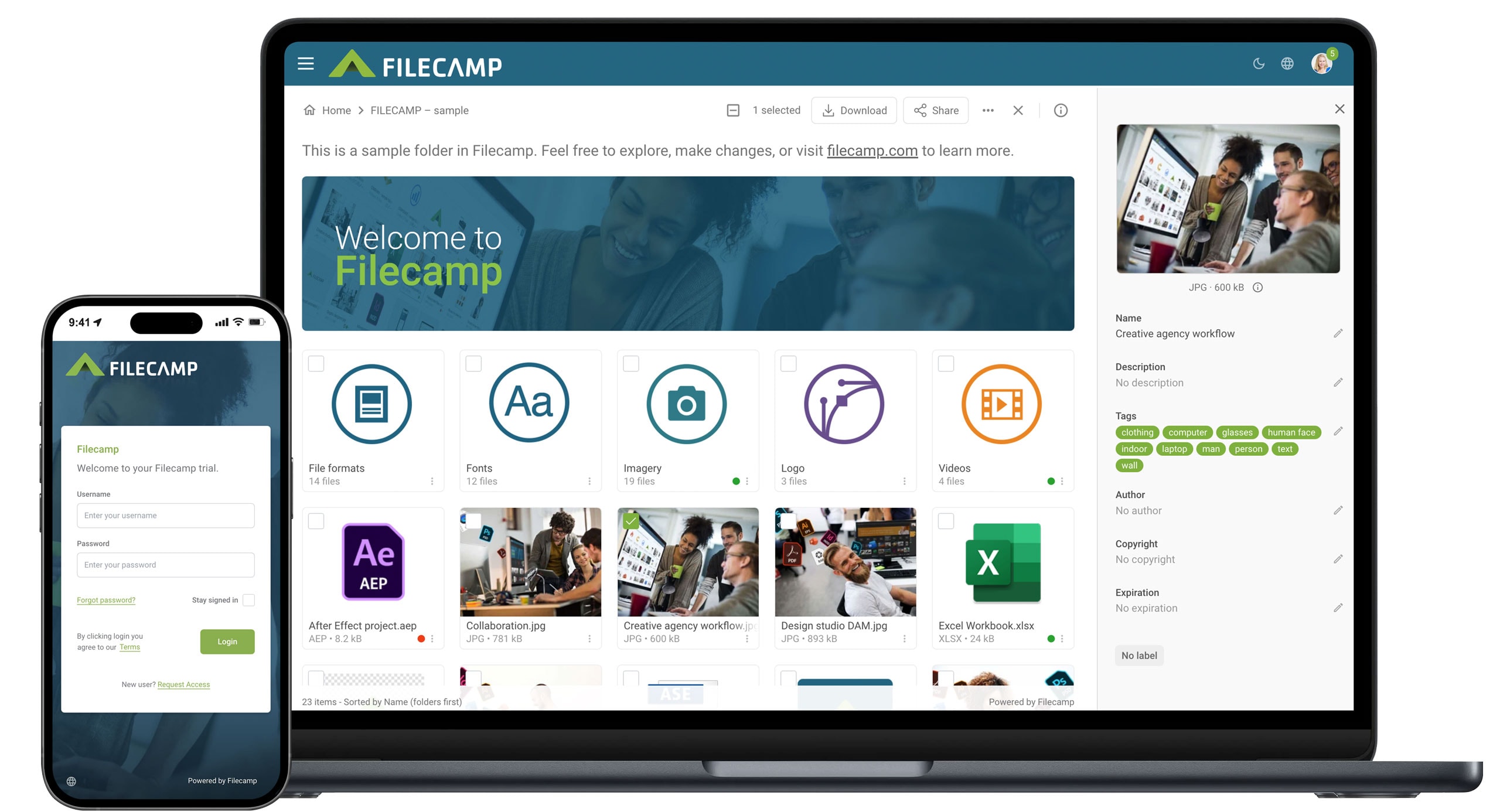
As a digital asset management (DAM) platform, Filecamp provides everything you need from a marketing asset library:
- Centralized storage and organization: All marketing and brand assets are stored in one cloud-based system with folders, tags, and metadata for easy navigation.
- Powerful tagging and searching features: Assets can be quickly found using keywords, tags, and metadata across images, videos, documents, and other file types.
- Version control: Filecamp ensures teams always access the latest approved version while older versions remain archived and controlled.
- Access control and permissions: You can define who can view, download, upload, edit, or share assets.
- Collaboration and review tools: Teams can comment on files, manage feedback, and streamline review and approval workflows.
- Custom branding and portals: The asset library can be fully branded and used to create client or partner portals that align with your brand identity.
Marketing asset library FAQs

Mostafa Dastras
Share this Post