
General settings
Manage account-wide settings for security, email, auto-tagging, branding, commenting, labels, and more.
General Settings
Log in as an Account Owner or Administrator. Go to Admin > General from the Main menu  in the top-left corner.
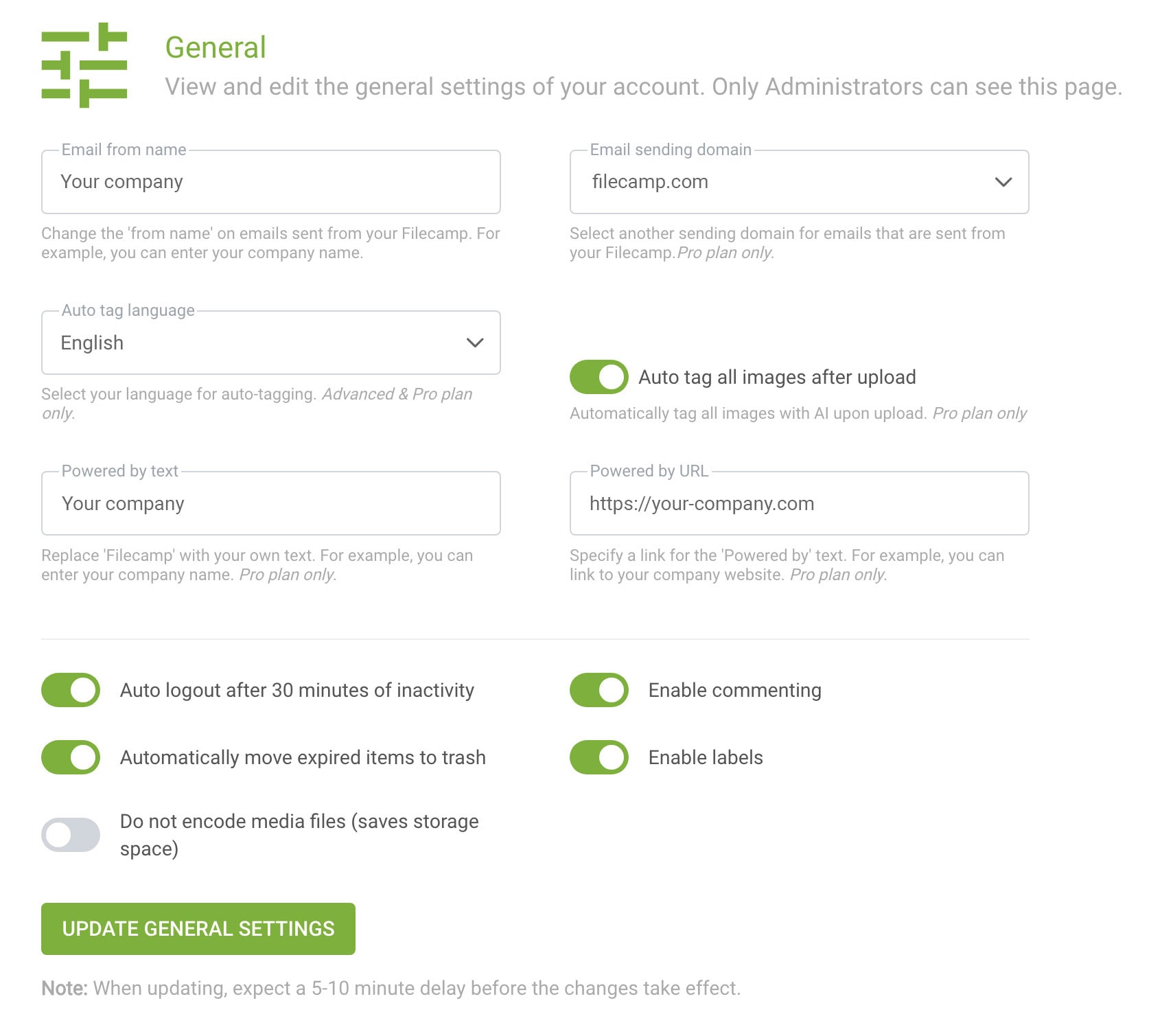
- Email from name – change the "from name" shown on emails sent from your Filecamp. For example, you can use your company or brand name.
- Email sending domain – Filecamp uses filecamp.com as the default sending domain. On the Pro plan, you can select another predefined white-label sending domain to reduce Filecamp branding in emails sent to your users. Pro plan only.
- Auto tag language – choose the language used for automatic image tagging. Advanced and Pro plans only. Read more about Auto-tags.
- Auto tag all images after upload – enable this setting to automatically tag uploaded images using AI. Pro plan only. Read more about Auto-tags.
- Powered by text – replace "Powered by Filecamp" with your own text, such as your company or brand name. Pro plan only.
- Powered by URL – specify the link used for the "Powered by" text. For example, you can link to your company or brand website. Pro plan only.
- Auto log out after 30 minutes of inactivity – enable this setting to automatically log users out after 30 minutes of inactivity. This can help prevent unauthorized access. Read more about security.
- Automatically move expired items to trash – enable this setting to automatically move expired files to the Trash. Read more about the Trash.
- Do not encode media files (saves storage space) – Filecamp normally creates browser-compatible versions of media files so they can be previewed. Enable this setting if you want to disable media encoding and save storage space. Read more about supported file formats.
- Enable commenting – enable or disable commenting across your Filecamp account. When disabled, users cannot comment on files.
- Enable labels – enable or disable Labels across your Filecamp account. When disabled, users cannot view or change Labels.
Tip: The Commenting and Labels settings are account-wide. If either feature is disabled here, it will not be available to users in individual folders.
Notice: Only Account Owners and Administrators can see and edit the General Settings.
When updating there is a 5-10 minute delay before the settings update. Check the log for confirmation or if any errors occurred.Notice: By customizing your email-sending domain, “Powered by” text, and “Powered by” URL options – along with deploying your own URL for your Filecamp – you can completely hide the Filecamp brand from your clients. Read more about white labeling.